Automation and Control · A Panta Rhei service by Kramer
One click.
Every room, every site.
Build a script once, in a visual editor, on the drivers you already have. Run it now or on a schedule, and Panta Rhei sends each command to the Site Agent that owns the device — across buildings, sites and continents — and brings back one log.
Run it once.
It runs everywhere it should.
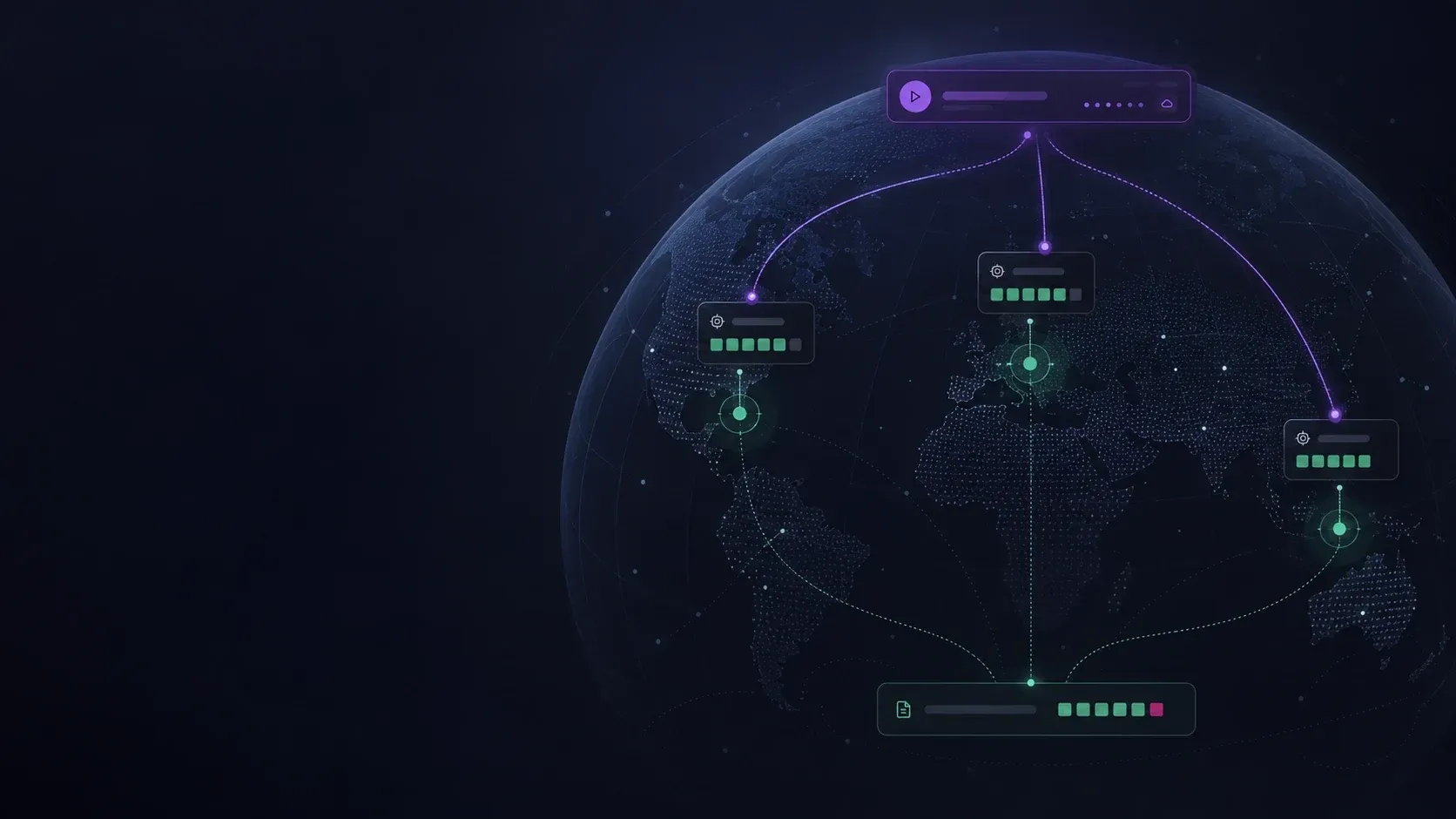
Automation goes through the Site Agents. Panta Rhei knows which agent owns each device, sends each command there, and collects the results — so a script reaches rooms across sites and continents as easily as one room.
Panta Rhei knows which Site Agent owns each device, and sends each command there
- Site AgentLondonHead office16 of 16 answered
- Site AgentBostonCampus13 of 14 answered
- Site AgentSingaporeRegional office10 of 10 answered
- Composed in the cloud
The script lives in the console. Nothing to program in the room, and no processor per room to buy.
- Executed by the agents
Each command runs on the Site Agent that owns the device — on the local network, wherever that is.
- Across environments too
One run can target rooms in one environment or several, on different continents, and it is still one click.
A library, not a list
of one-offs.
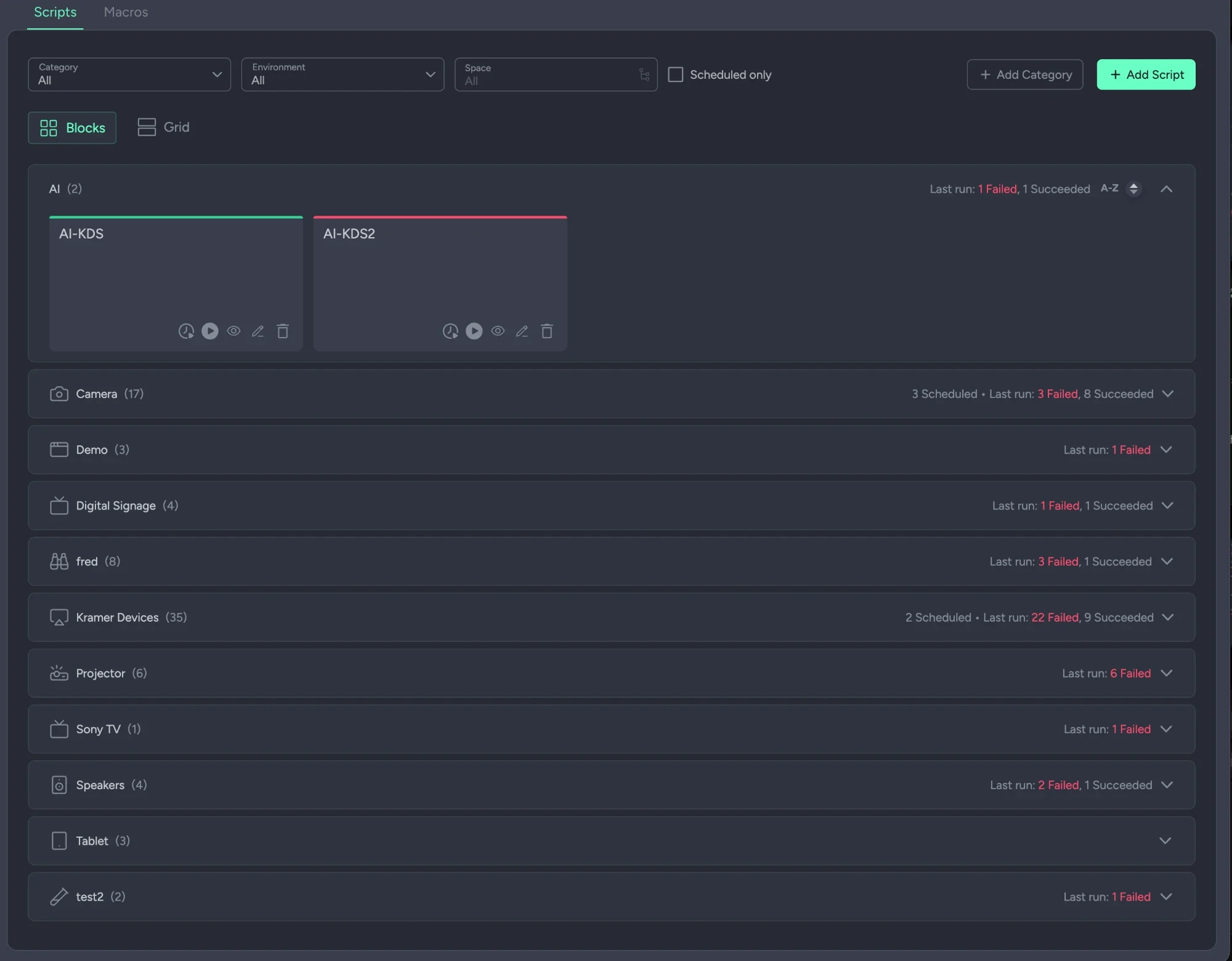
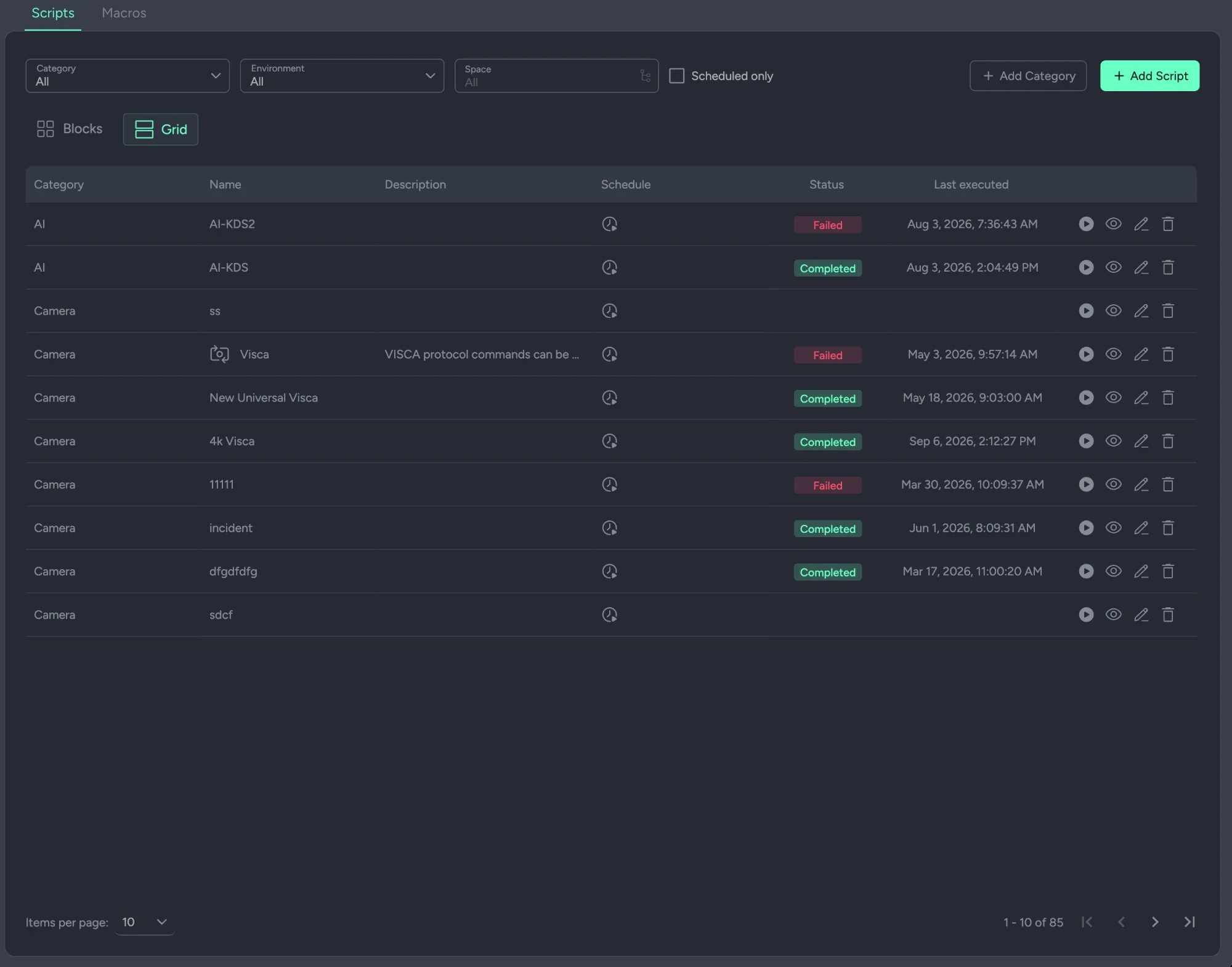
Scripts, the macros they share, and the categories that keep a few hundred of them navigable — two ways of reading the same library.
- ✦Scripts. A workflow that targets one device, a group, many rooms or several sites in parallel. Run it now, or on a schedule: the start-of-day and end-of-day routines that should not depend on anyone remembering.
- ✦Macros. A script saved as a building block, reused inside other scripts rather than pasted into twelve places.
- ✦Categories. Your own groupings with an icon each — cameras, signage, projectors — so a few hundred scripts stay navigable.
- ✦Two views. Blocks, grouped by category with the last run's failed and succeeded counts, or a grid with status, schedule and last execution per script.
Visual, because the people
who know the rooms are not programmers.
Drag blocks into a column. A command block is a driver, a command and the devices it targets; everything else is the logic around it.
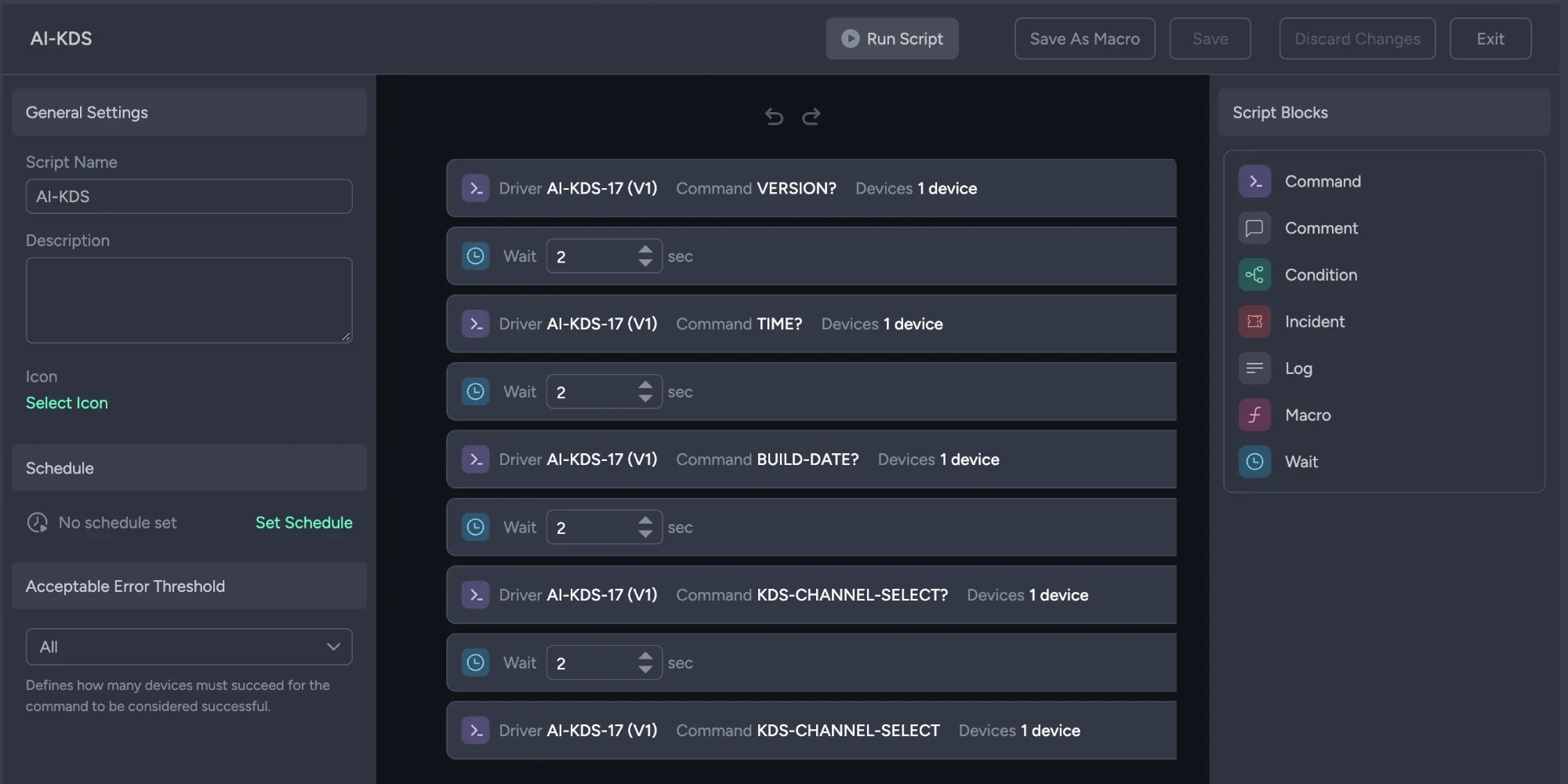
Drag blocks into a column and configure each one. Command, wait, condition, comment, log, incident, macro.
A command block picks a driver and one of its commands, then the devices. Anything with a driver can be in a script — and drivers can be yours.
Branch on success or failure, write to the log, and open an incident automatically when a step fails.
How many devices may fail before the run counts as unsuccessful. In a 400-room estate, one unplugged display is not a failed deployment.
Forty results,
not a green tick.
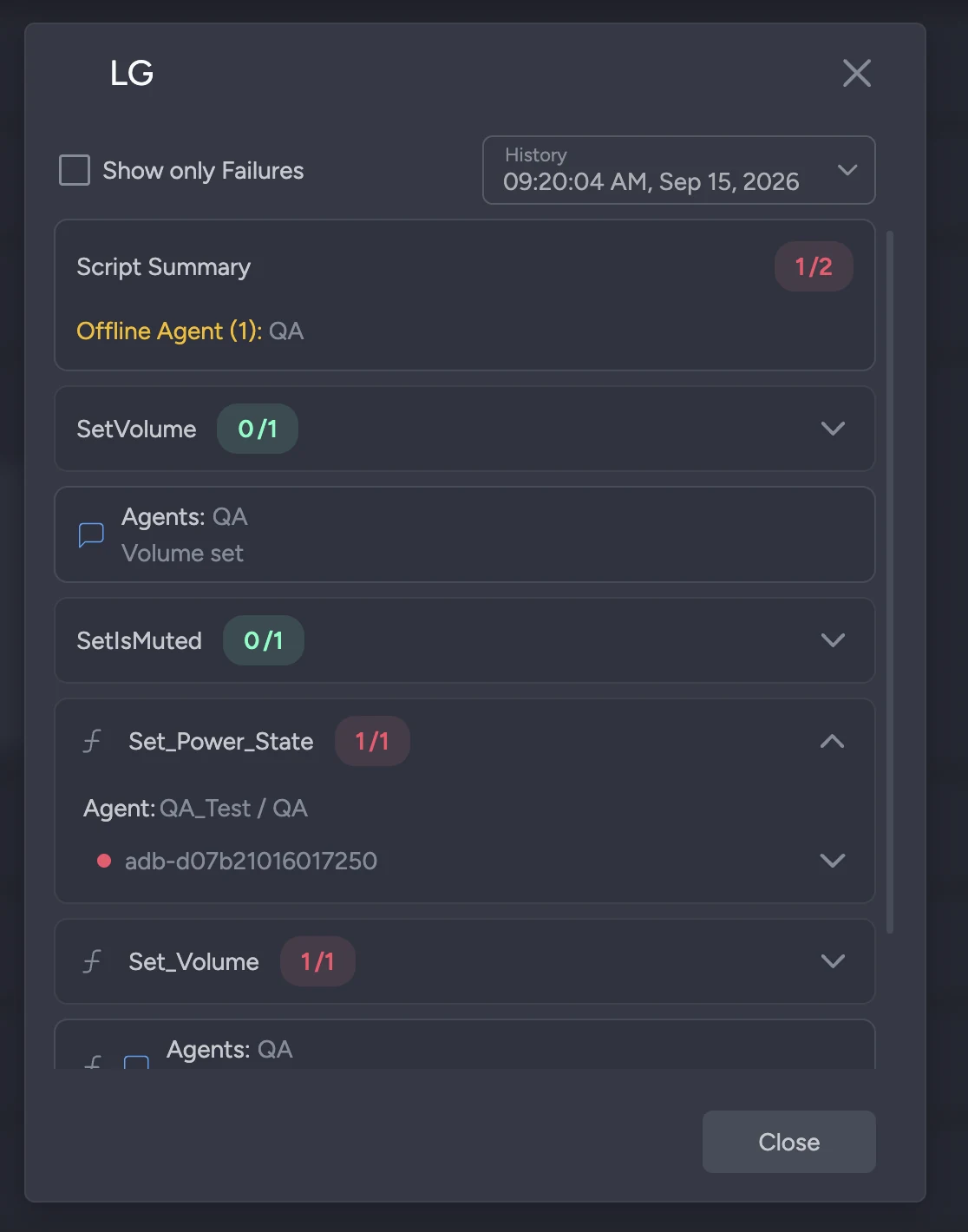
Every run, the agents push their logs back to the service. What passed, what failed, and the concrete error — consolidated from every site into one log.
- ✦Collected automatically. Every run, every agent reports back to the service on its own. The log is there when the run ends, from every site, without anyone fetching it.
- ✦Per command, per device. A step-by-step breakdown of each command, the devices it targeted, and success or failure per device with the concrete error attached.
- ✦Offline sites are stated. If a Site Agent was offline during a run, the log says so, so a partial result is never mistaken for a complete one.
- ✦History you can compare. Previous runs are kept, with a failures-only filter for when the question is what went wrong.
Nothing reaches a room
until you say so.
The gap between saving a script and the field seeing it is deliberate. It is what lets an estate this size be changed safely.
- ✦Nothing reaches a room until you publish it. Scripts are packed and published to the Site Agents from the Deployment Hub. Until then they exist in the cloud and nowhere else.
- ✦Pilot first, then everywhere. Pick the agents to publish to — one site to prove it, the rest once it is proven.
- ✦Only online agents receive a publish. A site that was down collects the change when it reconnects. The hub shows each agent's version and status.
The one thing to remember
Work in the cloud is not live work. A script exists only in the portal until it is packed and published — and only agents that are online receive it. Everything else collects the change when it reconnects.
A device has to be
integrated first.
A script acts through a driver. Until a device is associated with one, there is nothing for a script to call.
Drivers for any IP-connected device, Kramer gateways for the rest, credentials set once per manufacturer, and association in bulk — it is all on the Device Integration page, and it is the step that comes before this one.
The same drivers are what monitoring reads
A driver declares the states it can read back and the commands it accepts. Alert sensors bind to the states; scripts call the commands. One driver serves monitoring and automation both.
The questions IT actually asks.
Do we need a control processor in every room?
No. Scripts are composed in the cloud and executed by the Site Agents already on your sites. There is nothing to program in the room and no per-room processor to buy.
Can one script really act across sites?
Yes, and across environments. Panta Rhei knows which Site Agent owns each device and sends each command to that agent, so one click can reset a device in London and another in Singapore in the same run, with one log back.
What can it control?
Any device the platform has a driver for. Kramer ships a shared driver library, and you can write your own, so the limit is the drivers you have rather than a vendor list.
Do we need to code?
No. The editor is visual: drag blocks into a column and configure them. Commands come from drivers; conditions, waits, logs, incidents and macros are the logic around them.
Can a failure raise a ticket on its own?
Yes. An Incident block opens an incident in Incident Management when a step fails, with the script as its origin, so a start-of-day routine that finds a dead display has already raised the ticket by the time anyone arrives.
Does a change go live the moment we save it?
No. A script is packed and published to the Site Agents from the Deployment Hub, to the agents you choose. Only online agents receive it; an offline one collects it when it reconnects.
What has to be true before a device can be automated?
It has to be associated in Device Integration: a driver, a profile where it needs credentials, and a gateway where it has no network port. That is the step before this one.
Is Automation an add-on?
No. Automation is part of the Core package.
Bring the routine you run by hand.
The morning walk-round, the end-of-day shutdown, the reset that someone does from a laptop in every room. Bring one and we will build it as a script in front of you, and run it across every room at once.
Wondering what a script can reach? Anything with a driver.