Text
Static or dynamic text with newlines, border and background shapes. Resolves #roomname#, #devicename# and #ipaddress# per room.
Content & controlSession Manager · A Panta Rhei service by Kramer
Transform single-purpose meeting spaces into flexible digital environments. Session Manager dynamically adapts your room on demand—running natively and securely on local compute, with zero hardware changes.
100% software. Installs on the Windows PC already in the space — no appliance, no rack, nothing inbound. Built and supported by Kramer — AV engineering since 1981.
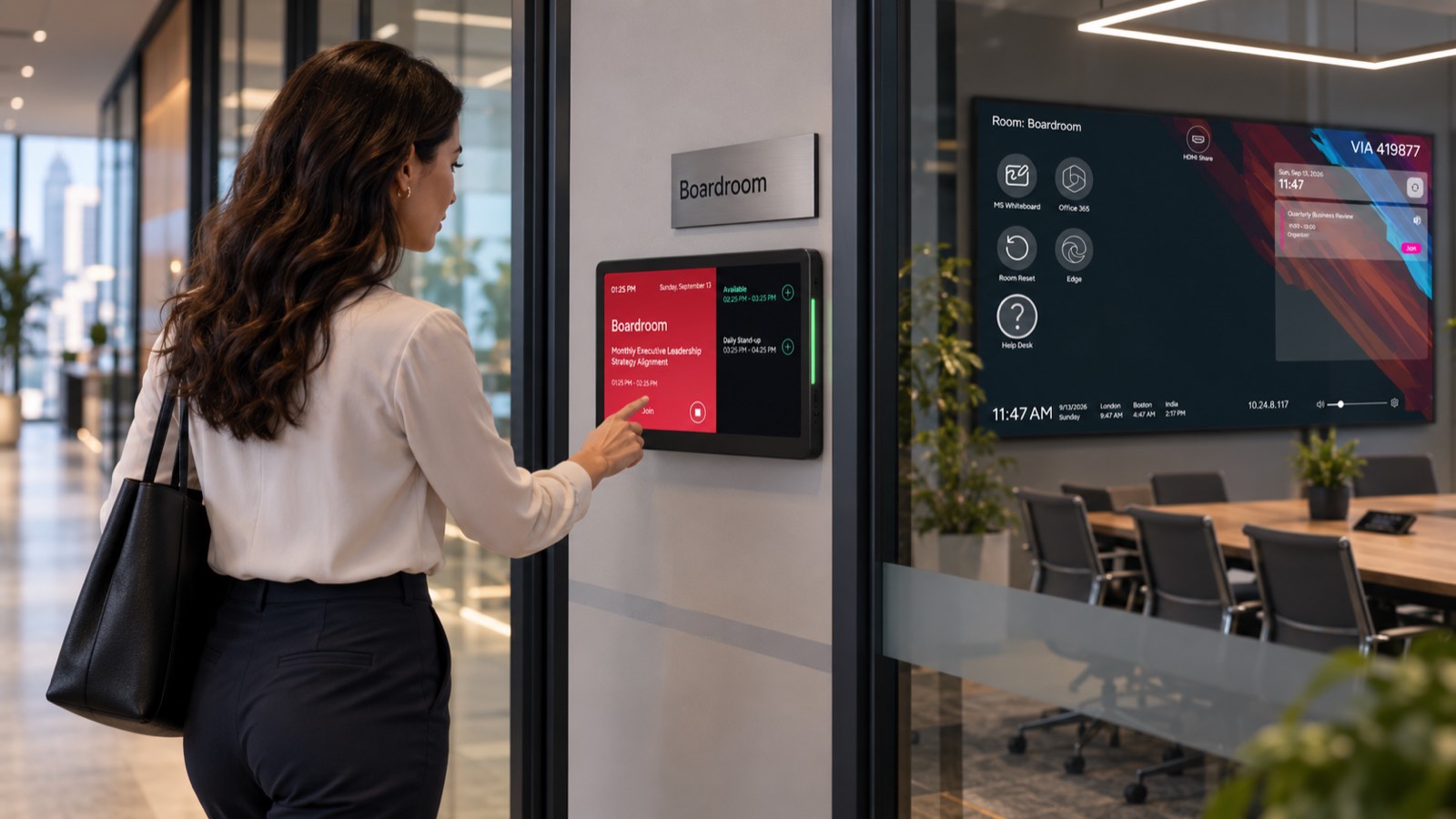
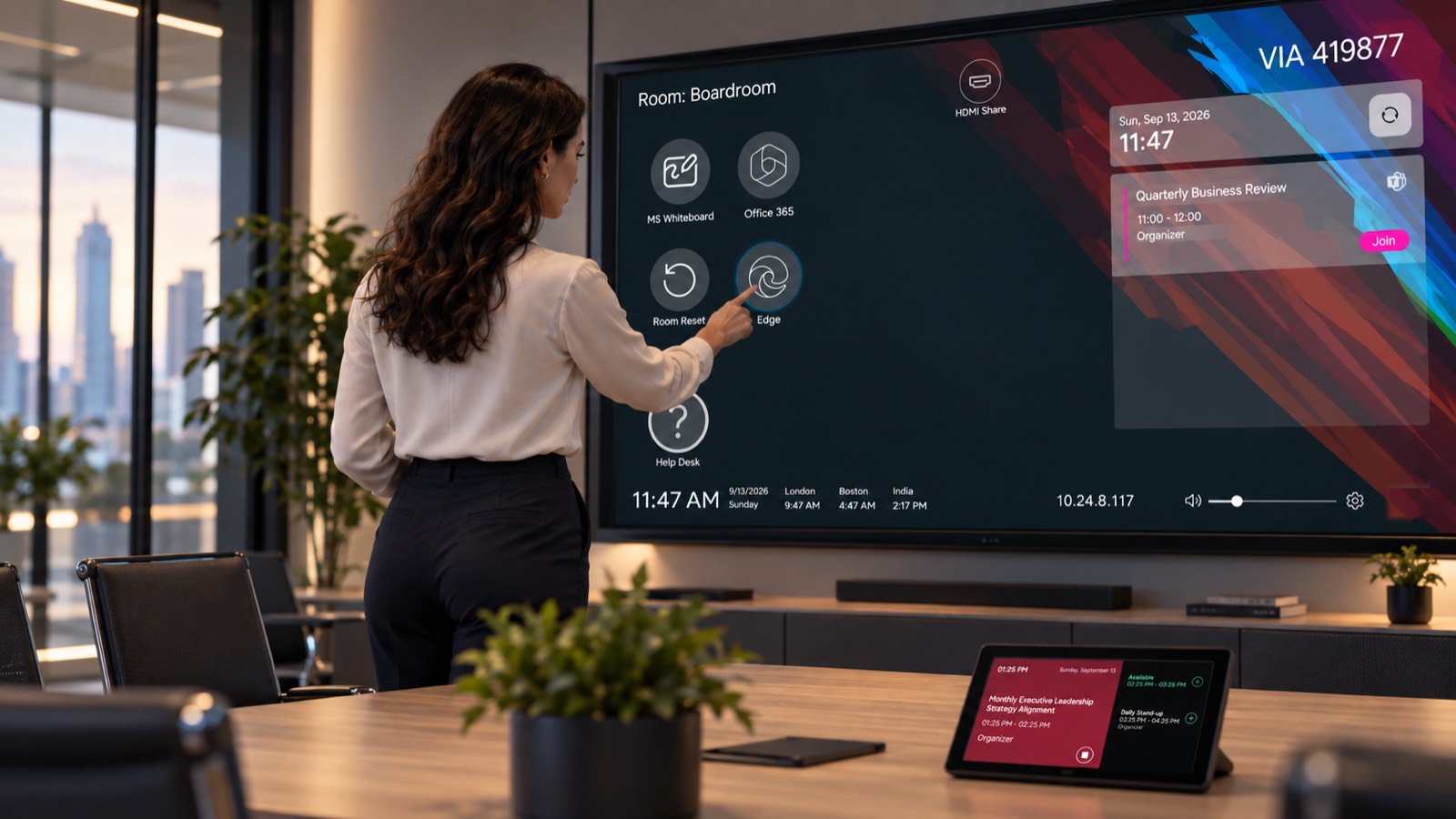
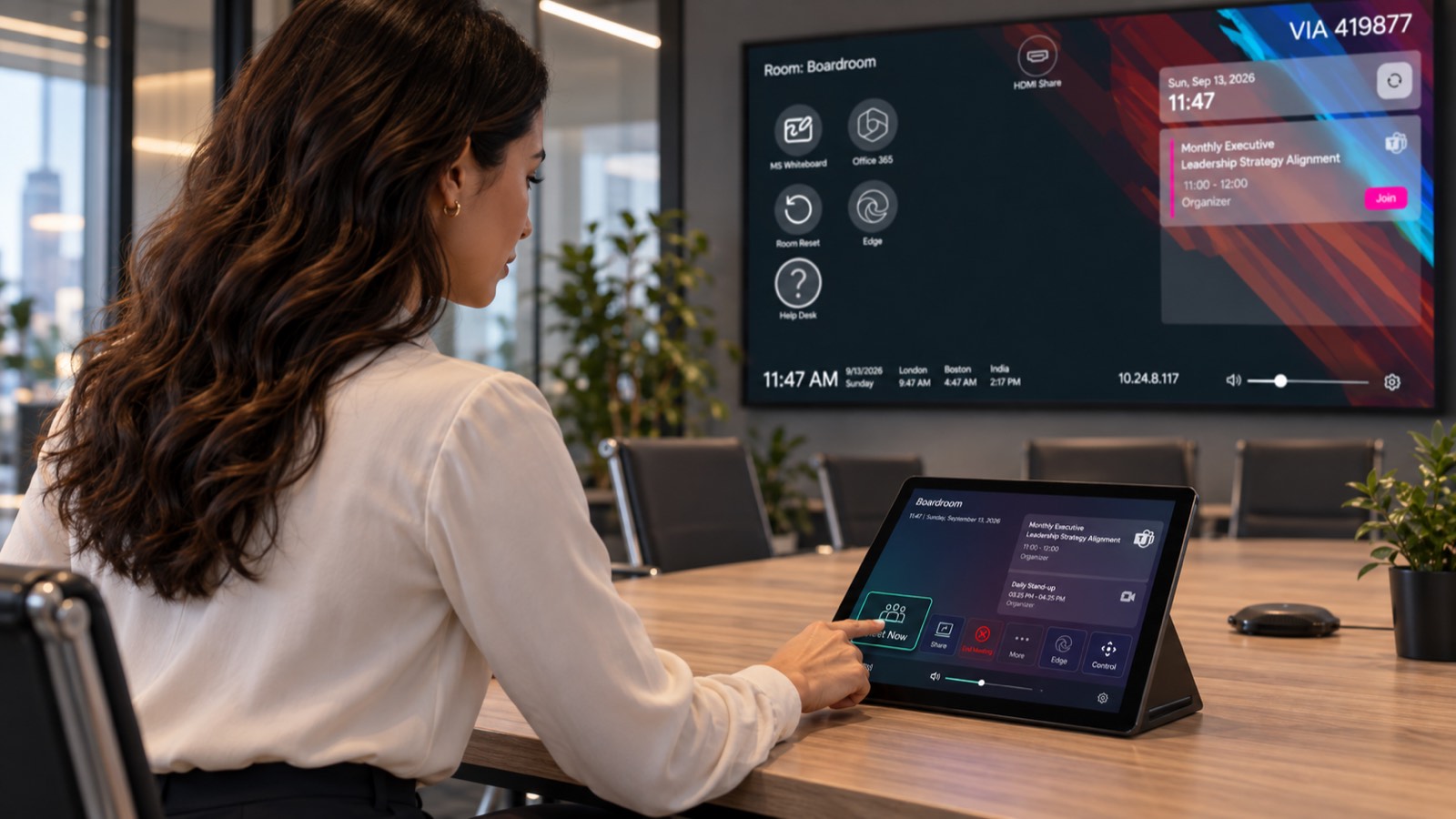
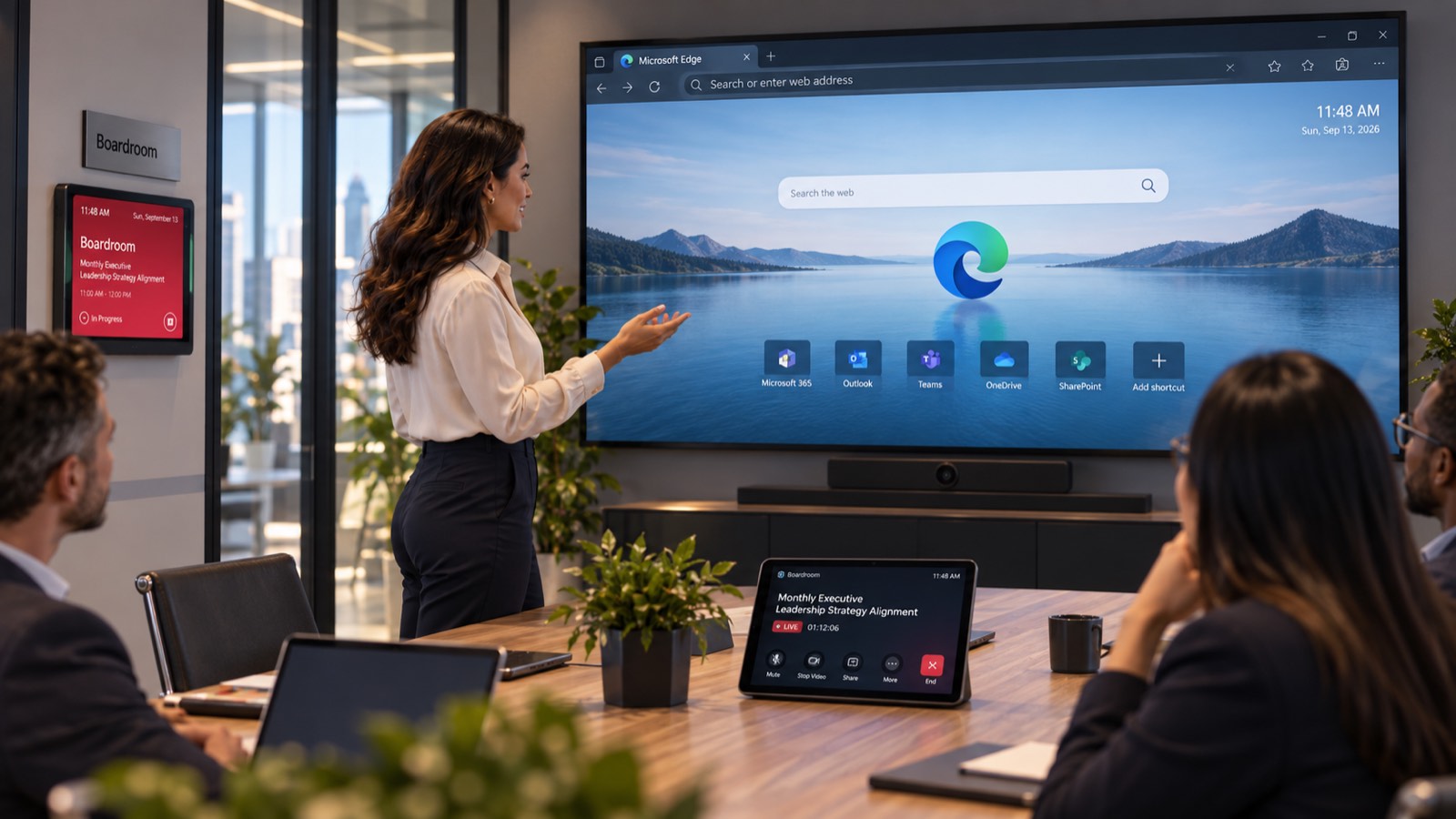
A single licensed device publishes to three independent surfaces, each running its own template and doing its own job — inside the room, at the table, and on the door. Together they cover the space from every angle.
At the door
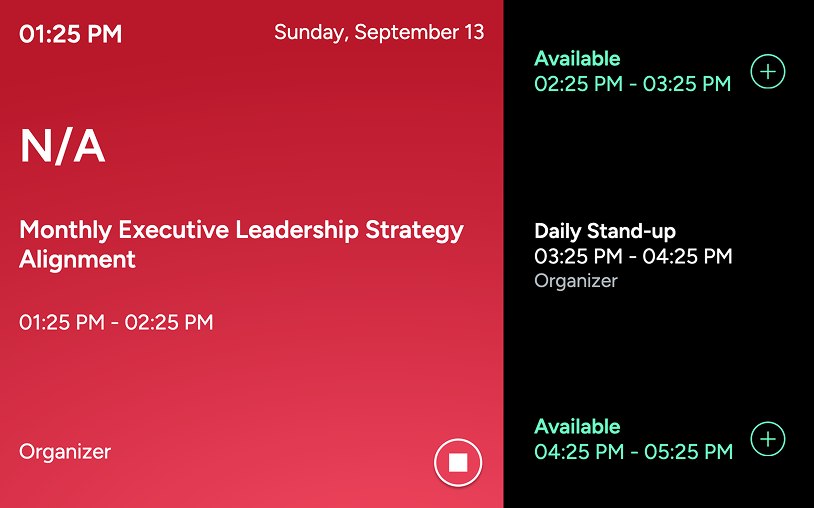
The panel at the door runs the scheduler built into Session Manager: what is on now, the next free slot, and a tap to claim it.
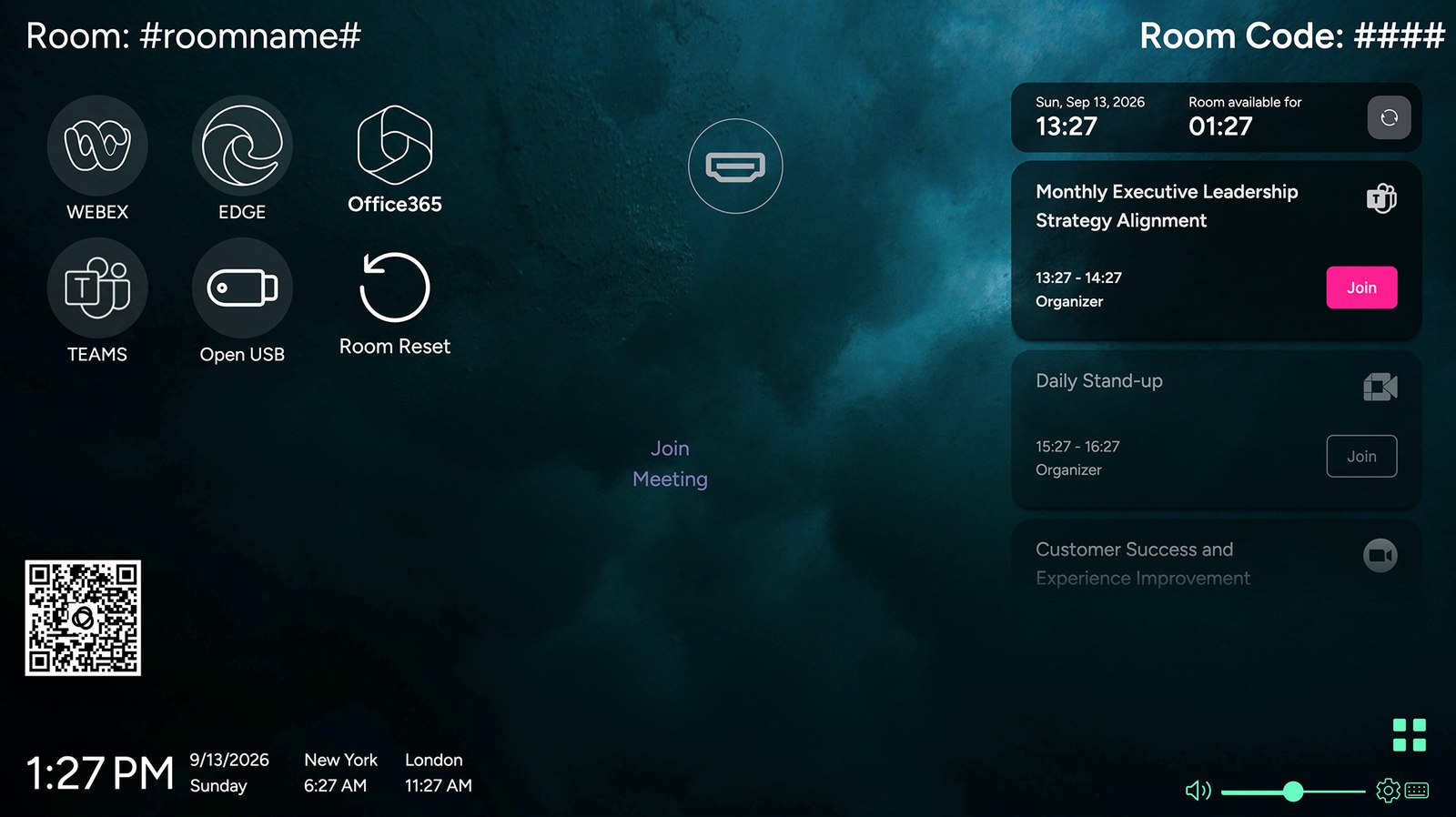
The room screen everyone sees. Your branded welcome layout while the space is idle, the day's schedule, one-tap join, and whatever is being shared the moment a session starts.
The control surface on the table. Drive the room without touching the PC: duplicate or extend to a second display, open the control interface, start the meeting, end it, reset the room, set the volume.
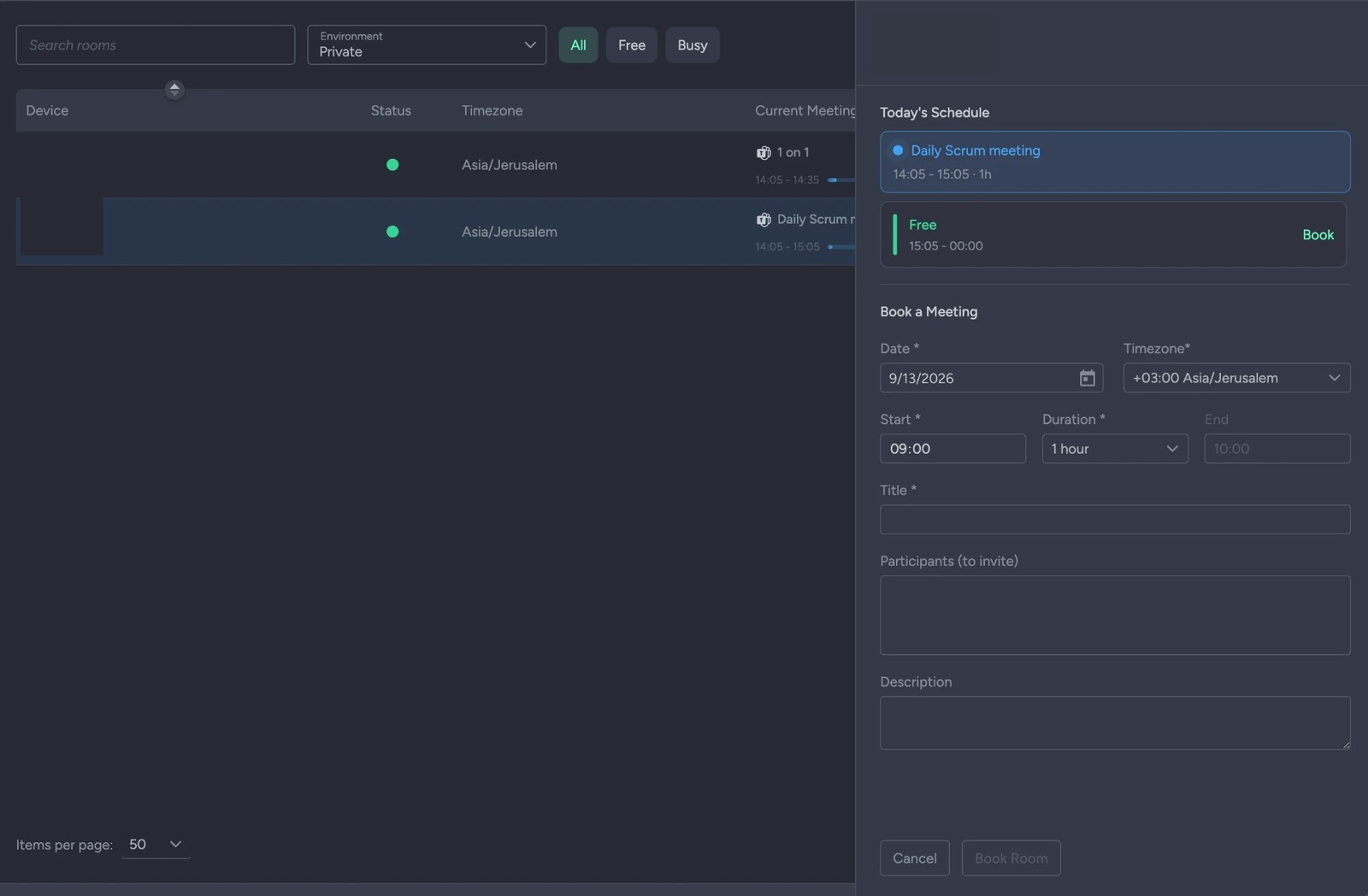
The panel at the door, running the scheduling system built into Session Manager. Free or busy at a glance, what's on next, and a single tap to claim the space — no separate room-booking product underneath it.
Not three systems to configure and chase: three template slots on the same room record — landscape for the wall, a control layout for the table, portrait for the door — sharing one calendar binding and one settings profile. One publish pushes all three, so the door panel can't drift out of step with the room screen.
Traditional meeting appliances solve basic video calls, but fail when modern hybrid work demands multi-platform agility, interactive tools, and continuous space utility.
When invites arrive from alternate UC vendors, static rooms break down into awkward BYOD workarounds. Session Manager provides native, one-touch join across all major platforms without hardware toggles.
External visitors shouldn't struggle with missing adapters or restricted network credentials. Provide frictionless wired and wireless presentation that connects any device in seconds.
Rooms sit idle outside scheduled calls. Instead of blank standby screens, transform dormant displays into valuable digital signage, company bulletins, and live calendar wayfinding.
Peripherals frequently fail undetected until the next VIP call starts. Continuous telemetry monitors cameras, audio endpoints, and displays to alert IT before meeting disruption occurs.
Session Manager eliminates room friction by adapting dynamically to users when active, and sanitizing the environment the moment they leave.
Modern enterprise and campus spaces do far more than host video calls. Session Manager decouples the physical room from rigid appliances, allowing any space to adapt dynamically to interactive teaching, high-stakes demos, executive briefings, or team collaboration.
Seamlessly bridge UCC calls with native line-of-business applications. Launch specialized web dashboards, LMS platforms, design tools, or any enterprise client directly on room compute without vendor lock-in or input swapping.
Complete operational privacy between groups. Scheduled, instant, or calendar-driven resets terminate active software, purge local downloads and cached credentials, and restore the space to a pristine state for the next session.
Deploy one scalable software standard across lecture halls, training centers, boardrooms, and public displays. Reconfigure what any space does in seconds by pushing a new digital profile from the cloud.
Every space has a unique purpose. Whether designing an executive boardroom, an active learning classroom, or an all-hands training hub, Session Manager lets you compose custom, branded room experiences using modular widgets—published across your fleet in minutes.
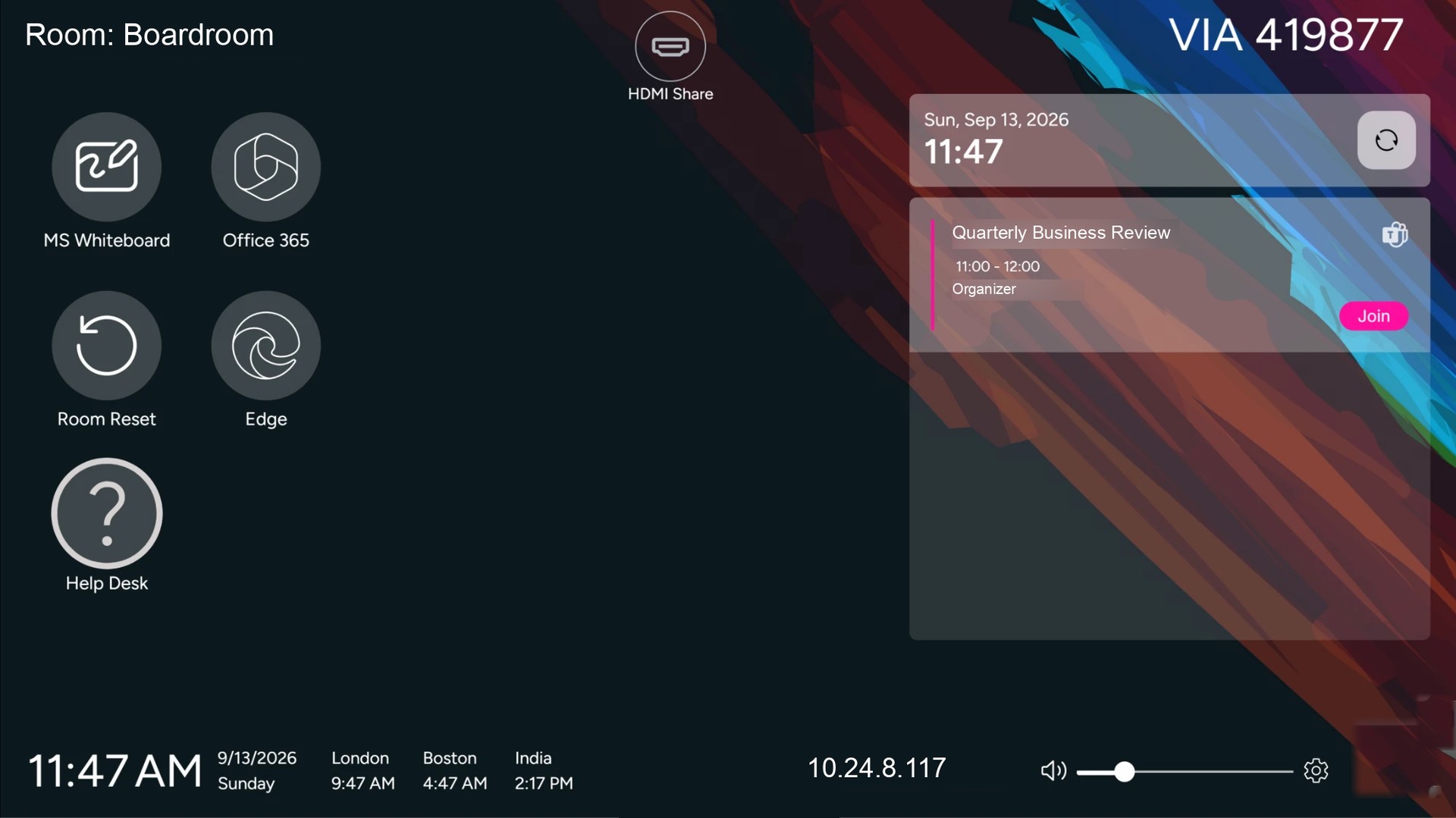
A streamlined, brand-aligned interface prioritizing high-stakes clarity. Features calendar one-touch join, multi-timezone clocks, wired and wireless content routing, and an instant zero-trace reset for C-level privacy.
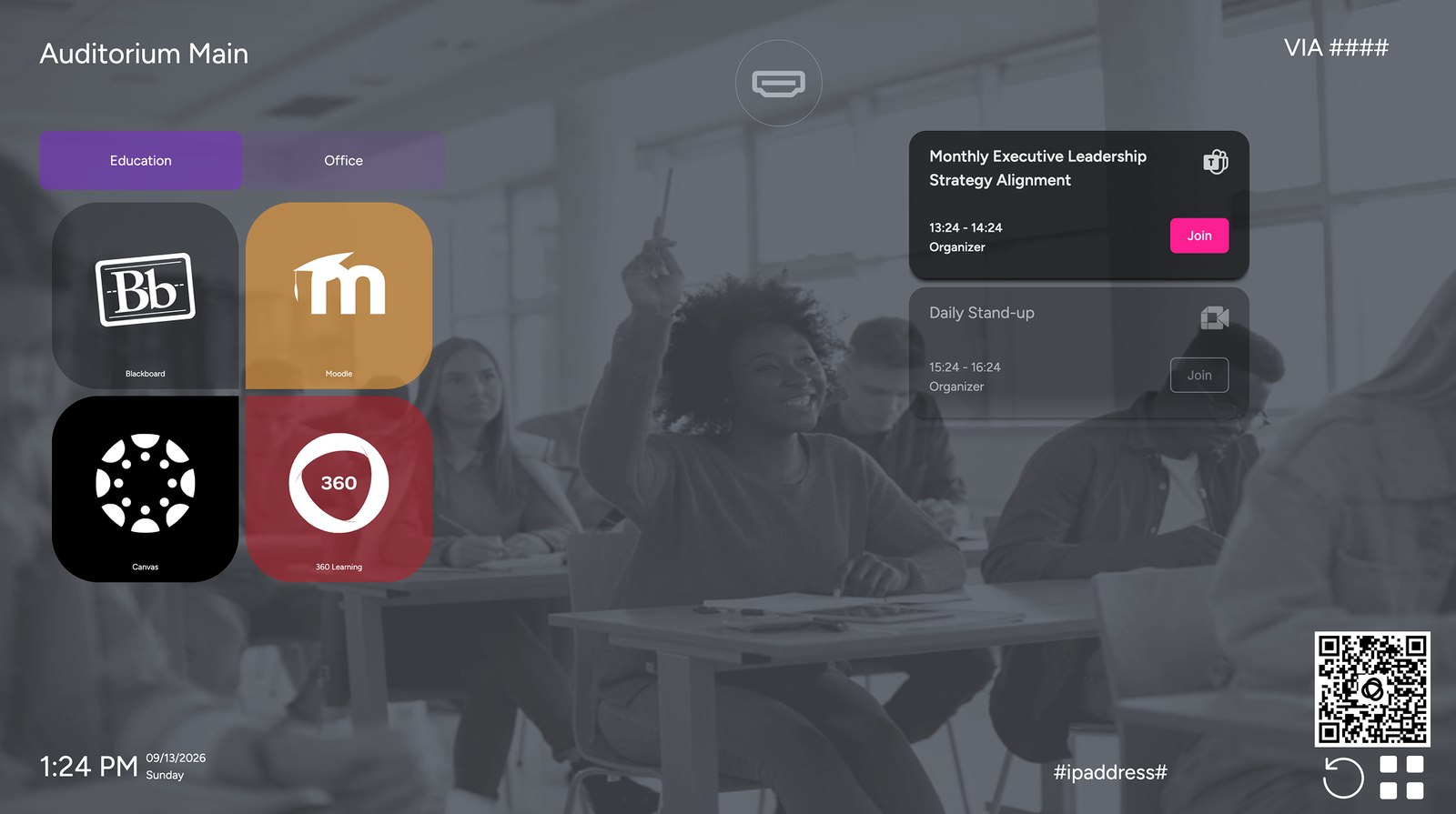
Optimized for instructors and hybrid students. Surfaces native whiteboard tools, LMS shortcuts, document cameras, and screen recording apps without exposing underlying operating system desktop clutter.
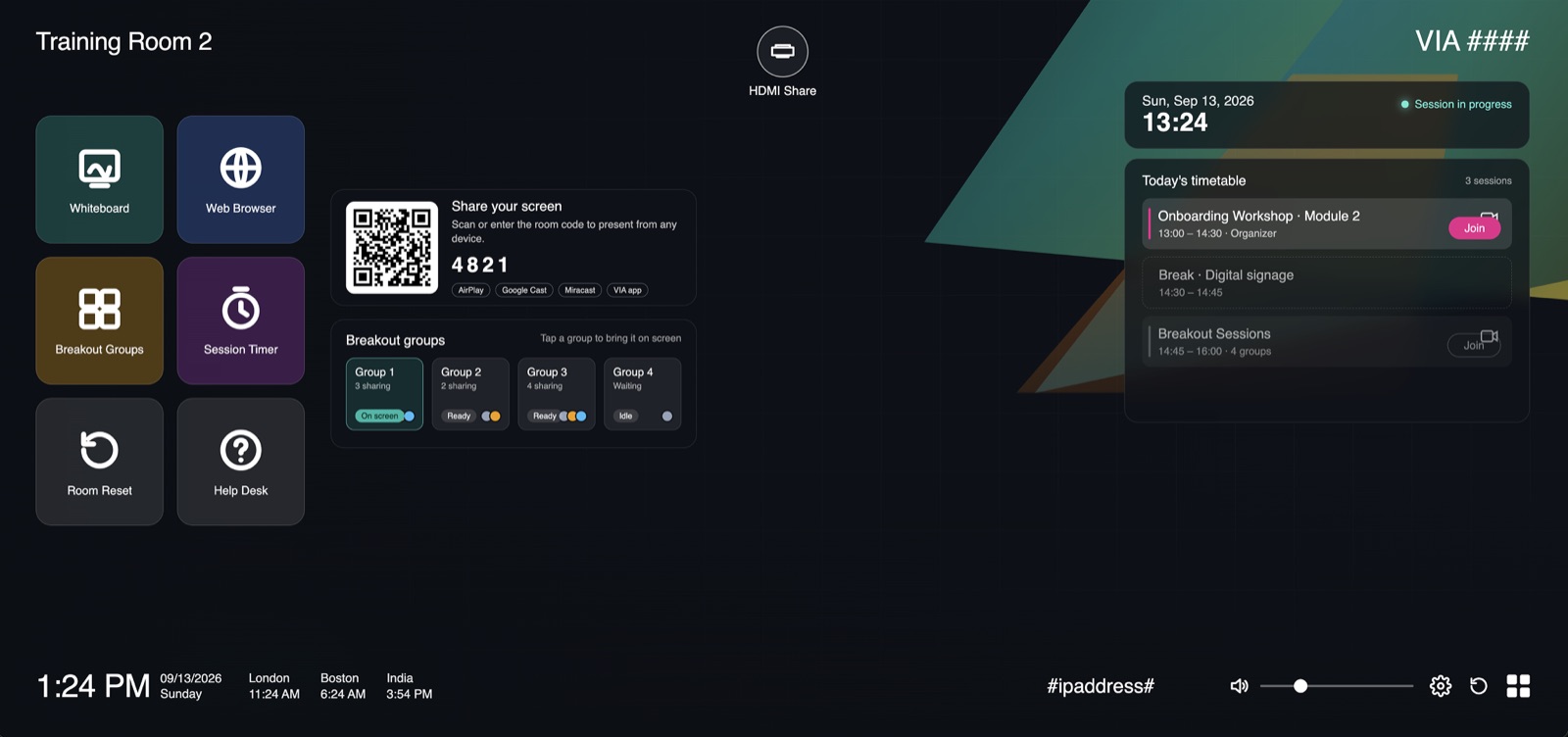
A high-engagement layout built for interactive workshops. Incorporates breakout group sharing, interactive web browser applications, and dedicated digital signage during breaks.
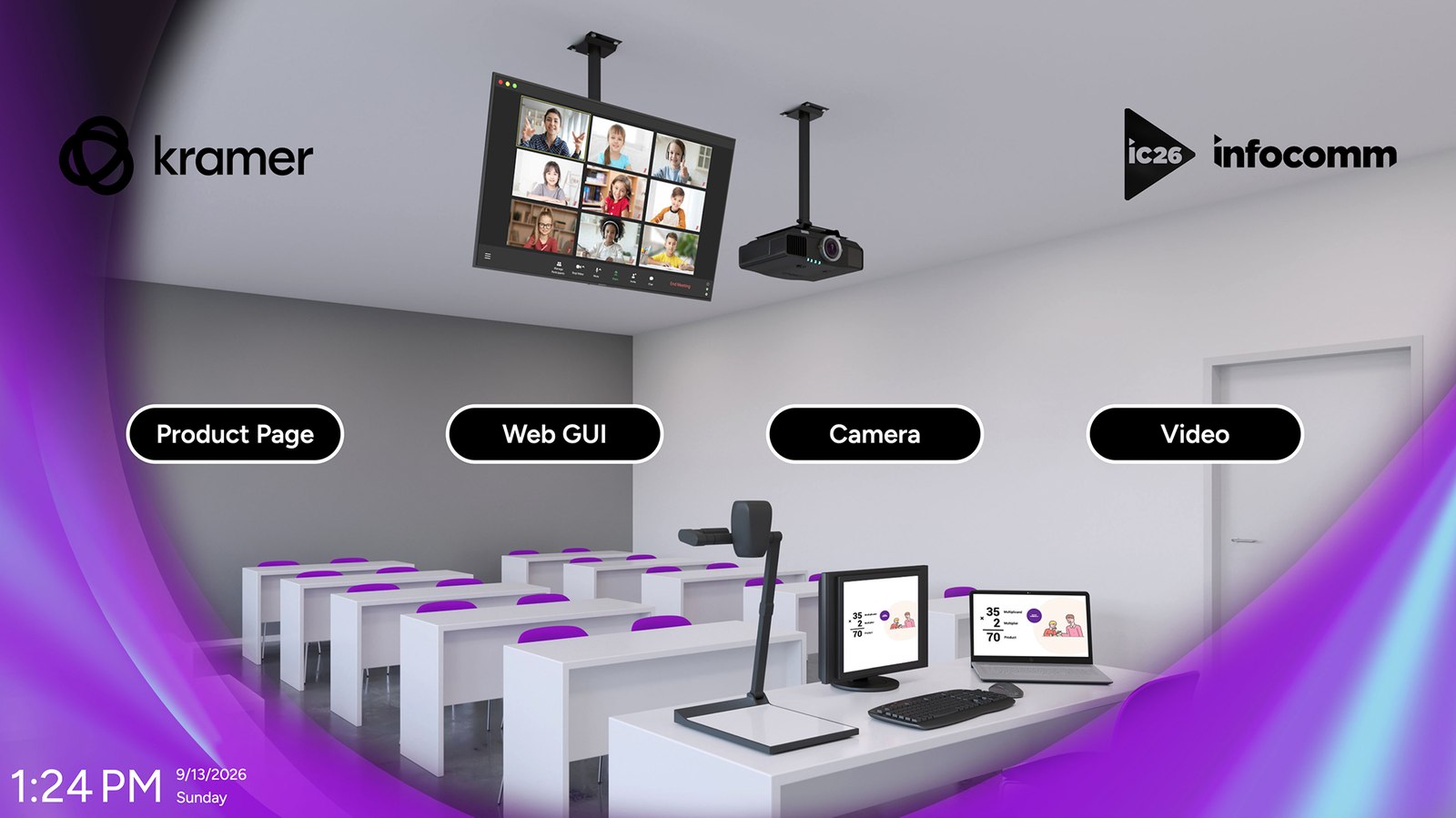
Every one of these is built from the same widget library, the same settings profiles and the same publish pipeline. Changing vertical means changing a template — not changing product.
All of it is configuration, not integration work. Open a step to see what runs.
Before anyone arrives
A scheduled reboot or a daily room reset runs before the building fills up: volume back to a known level, displays set to extended, yesterday's files, downloads and signed-in accounts cleared, and the welcome template back on screen. A post-startup script can then run whatever else local procedure demands.
Through the day
Instead of a screensaver, the display runs your template: today's schedule pulled live from the calendar, your logo and wallpaper, wayfinding, world clocks, an internal announcement. The space is doing communications work before anyone walks in.
The out-room tablet shows availability at a glance, warns that a meeting is about to start, and lets someone claim the space on the spot — while the in-room tablet and the main display run their own templates.
The meeting launches with a single touch in that platform's own application: Teams, Google Meet, Zoom, Webex, Pexip, Zoho, RingCentral or GoTo. Not an appliance mode, not a guest web page — positioned by a Display Rule you defined. The next meeting can be a different platform entirely.
Plug a laptop in and it's on screen — HDMI Share opens automatically the moment a machine is connected, on every edition. With Advanced, VIA is embedded in the room as well: people share wirelessly from a laptop, tablet or phone in one click, several of them at once, so a review becomes a genuine side-by-side comparison instead of a queue for the cable.
Five minutes out, a popup warns the room in your wording, with a live countdown. The team can dismiss it, suspend the reset, or extend if they are overrunning into a gap. Nobody is thrown out mid-sentence.
The room reset runs on the way out, so the next team walks into a clean, anonymous, ready space. What “clean” means is your definition, set once in the settings profile — the three phases are spelled out under Infrastructure & privacy.
A meeting that ends twenty minutes early shouldn't leave the space occupied and logged in. A true-idle event — no keyboard, no mouse, no audio for a period you set — can reset the room, close applications or run your own script, without waiting for the calendar to say the slot is over.
After the last meeting
End-of-day handling is the same machinery pointed at a different moment: post-session scripts to clean up, caches and profiles cleared, displays powered down, and a scheduled reboot so the space starts tomorrow in a known state rather than wherever it was left.
Health monitoring watches CPU, memory, storage and every peripheral the space depends on. Software updates roll out from the cloud. Template changes publish to a whole device group at once, and offline spaces collect them the moment they reconnect.
Configure room experiences, scheduling integrations, and operational policies from a single web console. The Session Manager Remote client runs natively on in-room compute—executing workflows smoothly and keeping spaces fully operational even if connectivity drops.
The centralized governance tier. Define UI templates, map workspace calendars, and configure enterprise session policies across global room profiles from any browser.
The on-premises software that replaces the desktop shell with the interface you designed, runs the real meeting clients, and wipes the space clean between sessions.
Dynamic meeting UI, native presentation, and active collaboration.
Landscape · In-room viewInteractive meeting orchestration, app launching, and environmental control.
Tabletop touch interfaceReal-time occupancy, instant ad-hoc booking, and schedule status.
Portrait · Room entranceA streamlined staging workflow designed for speed. The exact same process whether configuring a single executive boardroom or publishing across a 500-room global campus.
Link calendar services (Microsoft 365, Google Workspace) and upload brand assets to your centralized media library.
Drag and drop modular widgets — meeting joiners, clocks, app launchers, and signage — onto a live WYSIWYG canvas tailored to the space.
Set security controls, peripheral telemetry, launch behaviors, and automated session wipe rules once to reuse across room types.
License the room compute with a secure two-way handshake PIN. The local client connects instantly with zero firewall re-routing.
Map templates to up to three synchronized endpoints — main wall display, tabletop touch controller, and door panel — in a single publish.
Organize rooms into logical fleets by building, floor, or vertical. Push template revisions and automated updates globally without site visits.
Hosted across enterprise-grade global regions — withdedicated US and EU data residency options for strict sovereign compliance.
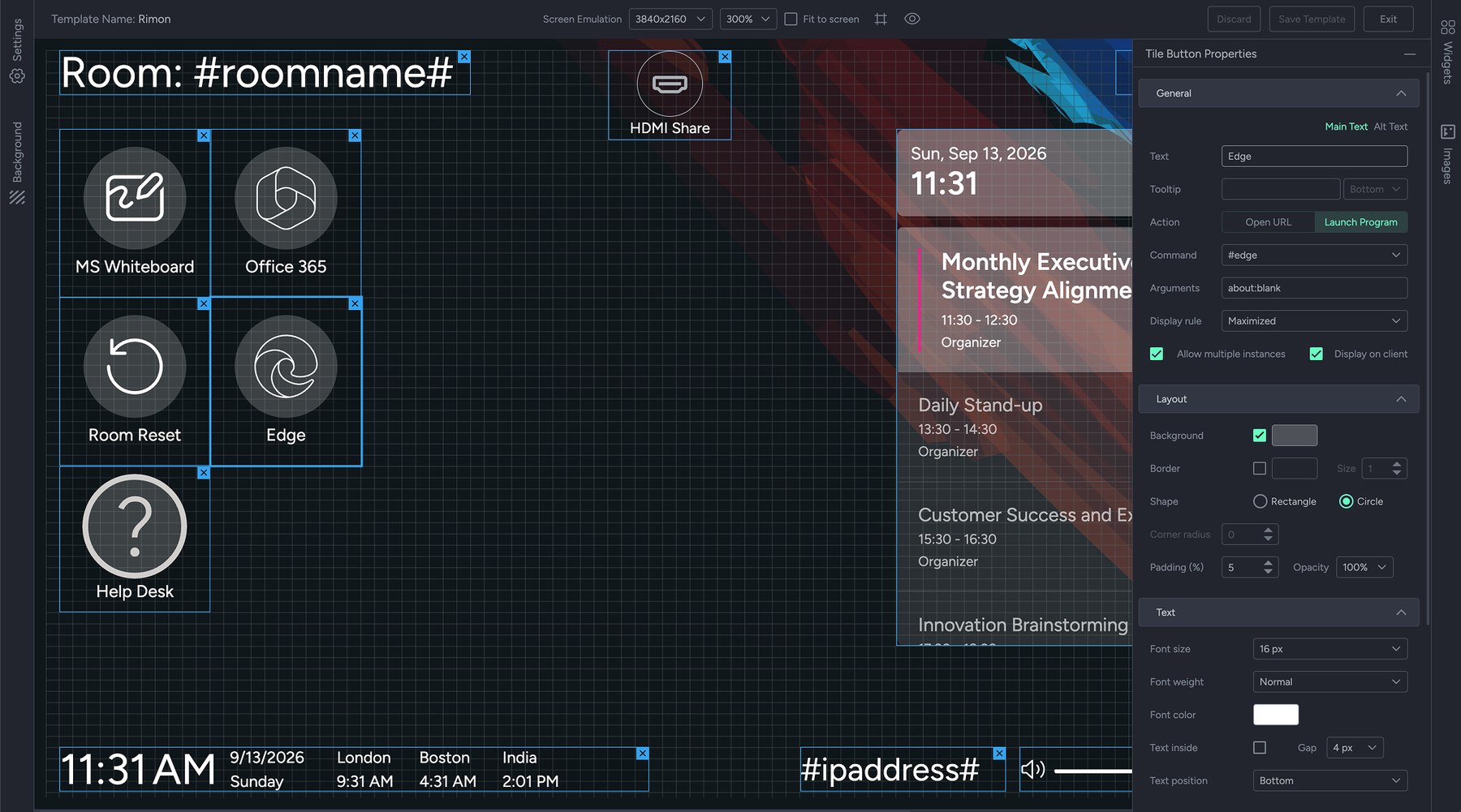
The screen below started as a blank canvas in the Template Editor. Drag widgets onto a snapping grid, emulate the exact resolution and orientation of the destination screen, and preview the whole thing live before a single room sees it.
Room displays are the most-seen screens in the building. Session Manager treats them that way.
Editing a template that four hundred rooms are currently displaying should never be nerve-racking.
#roomname#, #devicename#, #ipaddress# and #roomcode# resolve per room — so one template serves every room you run.Every element on a Session Manager screen is a configurable widget — dragged onto the grid, sized, styled and wired to an action. Calendars, room booking, launchers, wireless sharing, authentication, room control, automation. The library keeps growing.
Static or dynamic text with newlines, border and background shapes. Resolves #roomname#, #devicename# and #ipaddress# per room.
Content & controlTabbed navigation. Link other widgets so they show or hide with the active tab — horizontal top menu or vertical side menu.
Content & controlVolume slider, horizontal or vertical, with an optional settings icon for full audio control.
Content & controlCurrent date in four formats — DD MON YYYY, MON DD YYYY, DD MON or MON DD.
Time & dateCurrent time, 24-hour or AM/PM.
Time & dateCombined widget in an inline layout or a compact stacked one.
Time & dateMultiple city clocks side by side with optional vertical separators — built for distributed teams.
Time & dateLive meeting schedule from a linked account. Configure how many meetings show, the past-meeting window, subject privacy, size and dividers.
Calendar & bookingTablet-optimized schedule view with the same configuration as the list variant — also works on main displays.
Calendar & bookingFull-screen room scheduling for entrance tablets. Shows availability, books the room on the spot and warns of upcoming meetings.
Calendar & bookingDisplays the address of the associated calendar account via the #email# placeholder.
Calendar & bookingA tappable action: open a URL in a chosen browser, launch a program, reset the room or refresh the calendar. Fully styleable with Display Rules.
ActionsA grid container for tile buttons with configurable columns, rows, radius and padding.
ActionsLaunches windows or applications from the display, with configurable popup position and layout size.
ActionsA virtual trackpad that drives the main display from a tablet — cursor movement, left click and right click.
ActionsOne-tap IT issue reporting. Tapping an icon inserts the issue type into a message, stamped with the room and device name.
ActionsSSO widget — a guest scans with the Kramer mobile app to authenticate, reach their personal calendar and content, then sign out cleanly.
SharingTrigger and status for wired USB capture. Color changes with the state of the connected device, and can open automatically on plug-in.
SharingScreen share into an active Teams or Zoom desktop meeting — choose display 1 or display 2.
SharingThe current VIA room code via #roomcode#, with a configurable refresh interval and an always-show option.
SharingSurfaces the room code only when a VIA client prompts for login — invisible the rest of the time.
SharingScan-to-join QR for VIA, with the option to bypass room code entry entirely.
SharingTen tabs, each several layers deep. Build a profile once, bind it to a device group, and publish it to every space in that group — no site visit, nothing configured machine by machine. A sample of what sits in each:
Which client opens, and how the window lands.
Command slots for the people who run the space.
The daily rhythm, before anyone arrives.
Triggers that fire without anyone asking.
What “clean” means in your organization.
What a person can reach from inside.
How a session ends, and how politely.
How wireless sharing behaves here.
How a plugged-in laptop appears.
What counts as unwell, per space.
Three examples per tab, out of a great deal more. If your organization has a rule about how a shared computer should behave, it is almost certainly in here — and it applies to four hundred spaces as easily as to one.
Software events drive physical ones. Session Manager runs scripts and commands at the moments that matter, so starting a session can also wake the displays, recall the audio preset and fire your control-system macro.
Idle, after a period with no keyboard, mouse or audio activity. Interval, on a daily, weekly or monthly schedule. Post-startup, once the service has finished loading.
Run a room reset, open an application under a display rule, or execute a script with your own arguments — the hook where display power, audio presets and control-system macros get called.
Run your own commands when the service starts, when the space resets, and before or after every session — the seams where your own automation belongs.
A lockdown shell secures a desktop, which is what it is for. Session Manager also reads the calendar, so it knows when a session is starting, ending or overrunning — and can act on that, in the space, on the displays and across the AV system around them.
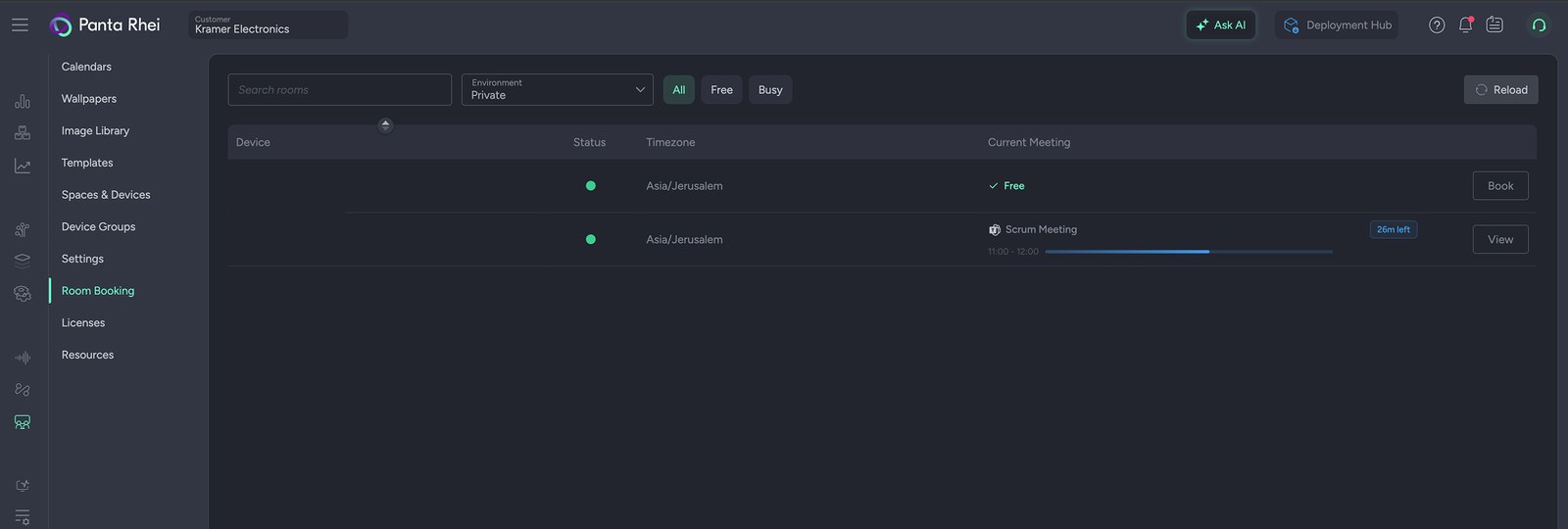
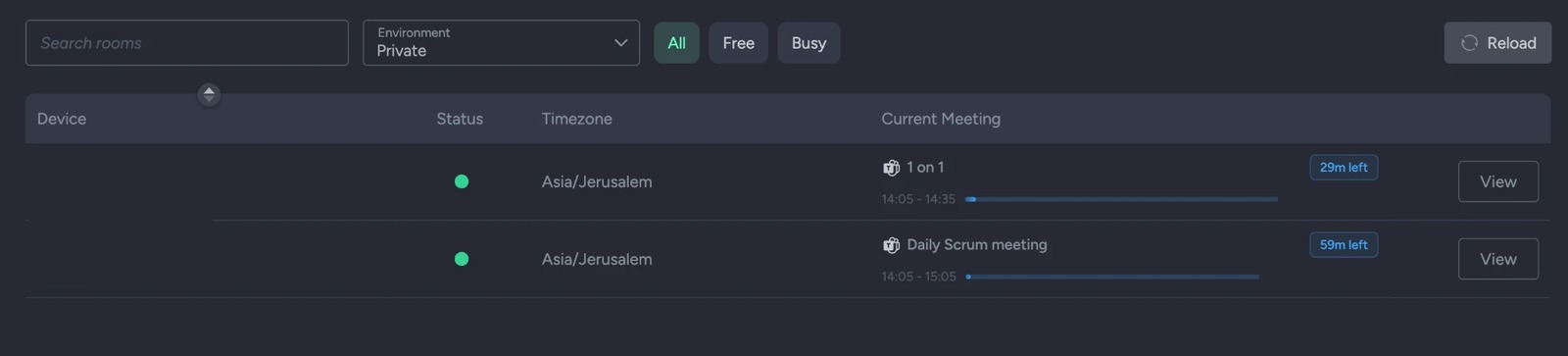
A live view of every room: which are free, which are in a meeting, how long is left in it, and a Book button for the ones that aren't.
Centralized policy management and native domain security for IT, paired with rapid deployment agility and full extensibility for integrators — on compute that stays inside your own perimeter.
Full sovereignty over local compute, identities, and security baselines.
Configure once, stage safely, and deploy across your entire fleet.
Deliver the locked-down reliability of a dedicated appliance without sacrificing domain governance. Session Manager isolates the user runtime, enforces corporate security baselines, and guarantees complete session sanitization between meetings.
Granular lifecycle reset policies executed locally on schedule, via one-click user reset, or calendar triggers.
Phase 1 — pre-reset
Phase 2 — sanitization
Phase 3 — restoration
Configurable to execute on calendar checkout, meeting end, idle timeout, or instant touch trigger — guaranteeing zero leftover data for the next meeting.
Session Manager was built for fleets — grouped, published, upgraded and monitored from the cloud, without a site visit.
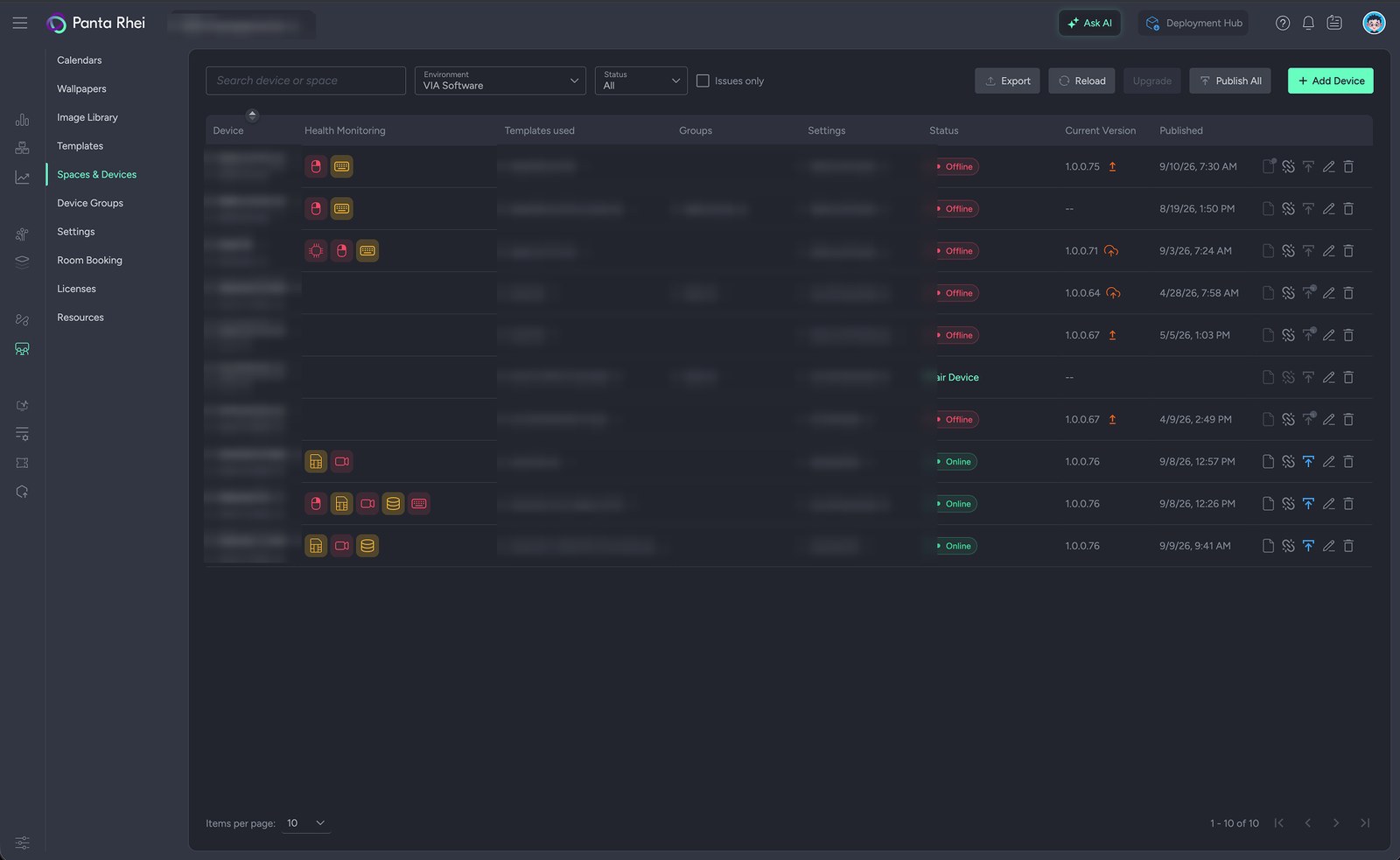
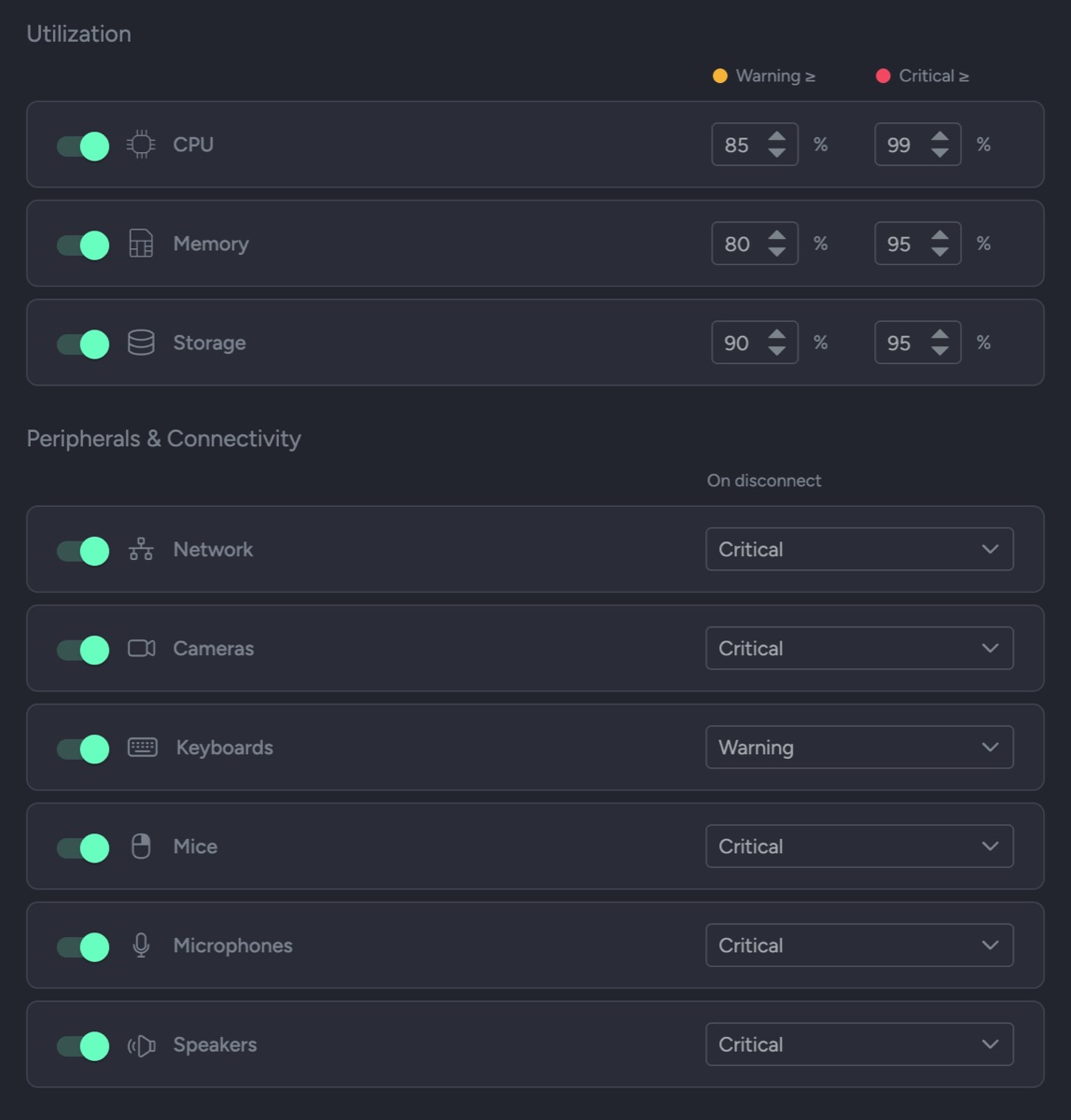
Those flags aren't a fixed vendor opinion about health. Monitoring is part of the settings profile, so each group of rooms is judged against the standard you set for it — and a metric you switch off is never evaluated and never raises an alert.
Group rooms by display type — main display, in-room tablet, door panel — bind a settings profile and a template, and publish to all of them at once. Offline rooms pick the change up the next time they connect.
A lightweight Upgrade Agent runs as an isolated system service on every room PC. Select the rooms, click upgrade, and they download, install and reboot themselves. No trolley, no out-of-hours site visit.
Rooms join on a two-way handshake — a code valid for two minutes, entered at the room, then explicitly approved in the portal. Unpair and the room erases every trace of its local data and returns to the activation screen.
Settings profiles and templates export and import, so a build you perfected in one tenant, site or demo room becomes the starting point for the next one instead of being rebuilt by hand.
Pull diagnostic logs from any paired room remotely, and filter Spaces & Devices to Issues only when you want the list narrowed to what actually needs attention.
Installers, the Upgrade Agent, Camera Manager and the VIA clients live in the portal beside dated release notes for every version — of the cloud service and the room software alike.
Panta Rhei is Kramer's cloud AV ecosystem — one login, one device inventory, one set of permissions, covering the whole lifecycle from deployment to analytics.
Welcome screens, meeting initiation, wireless collaboration and room reset. You are here.
Automated configuration and remote management of AV deployments across sites and tenants.
Cloud management for AV-over-IP, supporting multiple AVoIP technologies side by side.
Proactive notification when a device, room or service drifts outside the thresholds you set.
Ticketed workflow from first alert to resolution, tied to the room and device that raised it.
Usage intelligence across spaces — what's booked, what's used, what should be redesigned.
Certified UC appliances excel at single-vendor video calls. Session Manager is built for modern multi-use workspaces—delivering native meeting interoperability alongside dynamic enterprise applications, custom workflows, and full estate control.
Dedicated focus vs. multi-use orchestration
Every Session Manager license includes the full cloud design studio, the complete widget library, all eight meeting platforms and fleet management. Every edition lets someone plug a laptop in and present. Advanced embeds Kramer VIA on top, so people share wirelessly — and more than one of them can be on screen at once.
Annual subscription, per paired device.
The complete room experience — displays, meeting initiation and reset.
Everything in Standard, plus Kramer VIA embedded — wireless, multi-user collaboration.
Software only. Nothing to rack, nothing to rip out, and no vendor appliance to standardize on before you start.
Detailed system requirements, ports and supported peripherals come with thedemo.
Side by side across your rooms, and one or the other within any single space. Because Session Manager drives each platform's own client on the computer in the space, a given room runs one approach or the other rather than both at once. Most organizations use both: certified systems in the high-volume rooms standardized on a single platform, and Session Manager wherever a space needs several platforms, real applications, several people sharing at once, or a screen that stays useful when nothing is booked — including classrooms, showrooms and lobbies, which room systems were never meant to cover.
Eight, each running its own native client: Microsoft Teams, Google Meet, Zoom, Webex, Pexip, Zoho, RingCentral and GoTo Meeting. For each one you decide how it opens — desktop client, Edge, Chrome, incognito or internal browser — and which Display Rule positions the window: which screen, maximized or windowed, and what percentage of the display it occupies. The person in the room still only sees one button.
The room runs as a hardened kiosk inside your own management perimeter. Session Manager replaces the desktop shell with a controlled interface, enforces the operating-system restrictions you specify, and purges files, downloads, history and credentials between sessions. Because the computer in the space is managed like any other you own, it inherits your sign-ins, your security software and your update policy — there is no vendor-controlled appliance in the middle. The cloud service itself runs from two hosted sites — International (US) and an EU site for EU customers.
No. Session Manager installs on the computer already in the space and talks outbound only — nothing inbound, nothing exposed. Tablets, capture cards and VIA gateways are optional additions, not prerequisites.
Pairing is a two-way handshake: generate a code in the portal (valid two minutes), enter it at the room, approve the request. After that, templates and settings publish from the cloud on demand or on a schedule. Offline devices aren't a problem — they collect pending changes the next time they connect.
Yes, and this is deliberate. Changes are held until you click Package, and rooms keep running the last packaged version until you publish. Templates in active use can't be deleted, and system templates can't be edited at all — you duplicate them first.
Whatever you define it to clear — the three phases are set out in full under Infrastructure & privacy. What is worth knowing here is when it runs, which is also yours to choose: at the end of every scheduled slot, only after meetings that were actually joined, on a daily schedule, at service startup, or on demand from a tile button.
Health monitoring is configured per settings profile, and you activate only the metrics that matter for that room type. CPU, memory and storage carry warning and critical thresholds; network, camera, microphone, speakers, keyboard and mouse raise a warning or critical flag on disconnect. Flags appear as colored icons against the room in Spaces & Devices — so a room that lost its camera is visible before its next booking, not during it.
Sharing. Both editions include HDMI Share, so anyone can plug a laptop in with a cable and be on screen straight away. Advanced embeds Kramer VIA in the room on top of that: people connect wirelessly from a laptop, tablet or phone in one click without installing an account, and — the part that matters most — several of them can share at the same time, so content sits side by side for comparison instead of one person at a time taking the screen. Choose Standard where a cable is fine; choose Advanced where sessions are collaborative.
From the cloud. A lightweight Upgrade Agent runs as an independent system service on each room PC, isolated from the Session Manager application itself. Select the rooms in the portal, click upgrade, and they download, install and reboot unattended. Session Manager also checks for new versions hourly and on every publish or service restart.
A working demo takes one room computer and about twenty minutes. Bring a space, a calendar and whichever meeting platforms your organization actually uses.
Not ready to talk? Watch a room run or read the questions IT asks.