Environment and Inventory · A Panta Rhei service by Kramer
Every site,
every device.
One record.
Environment and Inventory is the spine of Panta Rhei: the structure of your estate and the record of everything in it. You build it before the first device is online, Discovery keeps it current, and every other service reads from it.
Everything else on the platform
reads from here.
Discovery, an Excel file, a technician with a phone: they all fill the same record. Monitoring, automation and every other service address it. There is one idea of where a device is.
- Excel importThe whole structure, in one upload
- Built by handSpaces and devices added in the tree
- Mobile appScanned in on site, by serial or MAC
- DiscoveryFrom every Site Agent bound to the environment
- EnvironmentHead office
- SiteCampus North
- BuildingBuilding 1
- FloorFloor 4
- Room4.12 Boardroom12 / 12
- Unassociated devices104
- Network Switches1 / 1
- Site Agents3 / 3
- Monitoring and AlertsAn alert names the room
- Automation"Every room in this building"
- Session ManagerA room and its devices
- AVoIP ManagerStreams by space
- Kramer ConfigSettings, per device
- Deployment HubSite Agents, per environment
- Counts that show the gap
Every space carries devices found against devices assigned. 11 / 12 means one is missing, visible from the tree.
- Nothing found is lost
A discovered device with no place to go waits in Unassociated devices until someone gives it one.
- Matched by MAC
A device you created with its MAC address is associated automatically the moment Discovery finds it.
- One environment, many agents
Several Site Agents, in different locations, bind to the same environment. What each one finds is consolidated into one estate.
Three ways in.
Before a single device is online.
The estate is set up first and found second. Whichever way it goes in, Discovery finishes the job.
- 01
Upload the estate
One Excel file with the whole structure: sites, buildings, floors, rooms, and the devices meant to be in each. The project exists before anyone is on site.
Excel importExport back outDuplicate - 02
Or build it in the tree
Add spaces and devices by hand, with the space type, capacity and room ID. Business hours and maintenance windows are set once and inherited.
SpacesDevicesInherited settings - 03
Or scan it in, on site
Each space has a QR code. Scan it with the Panta Rhei mobile app and submit the devices in the room by serial number or MAC address.
Mobile appQR per spaceSerial or MAC - 04
Then Discovery keeps it current
Anything created with its MAC is associated automatically when found. Anything else lands in Unassociated devices, where it is visible rather than lost.
Auto-associationUnassociated devices
Set once.
Inherited by every room in it.
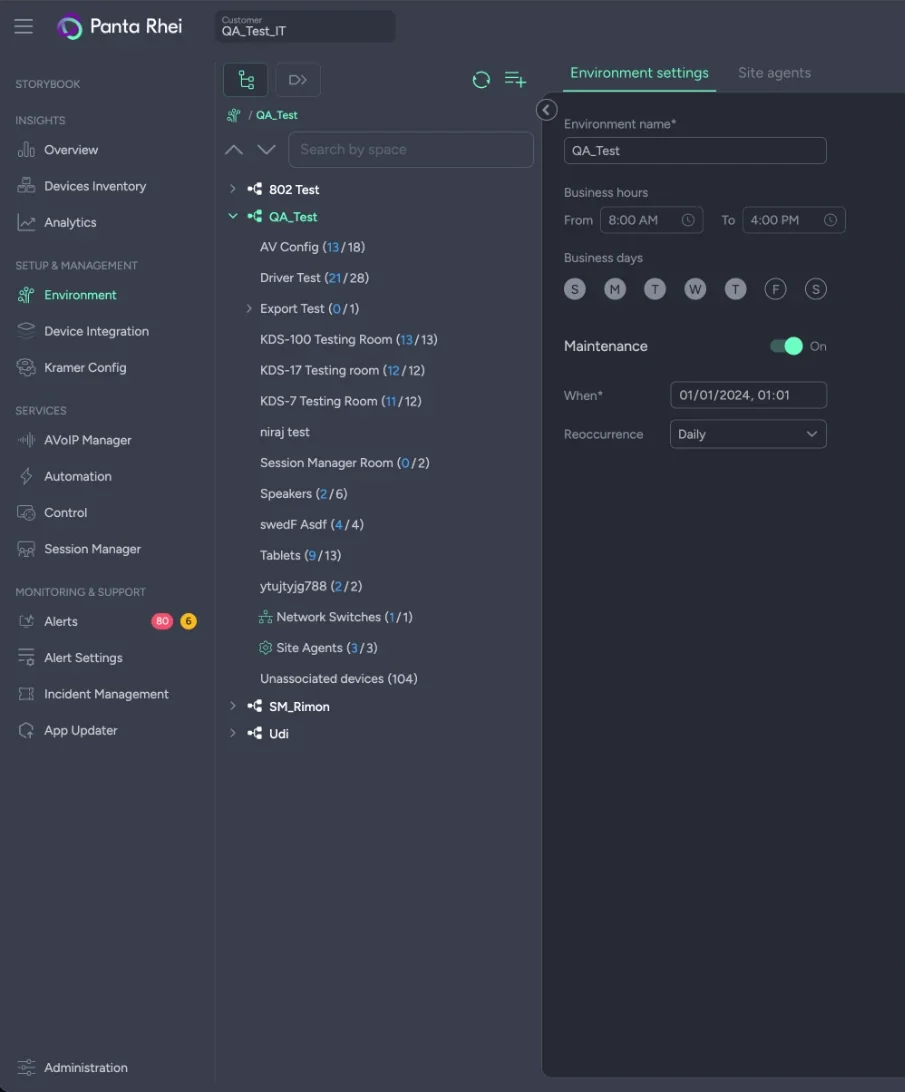
An environment is one estate: its tree, its hours, its maintenance window, its place on the map and the people who work on it. Every space inherits all of it, and any single room can override what it needs to.
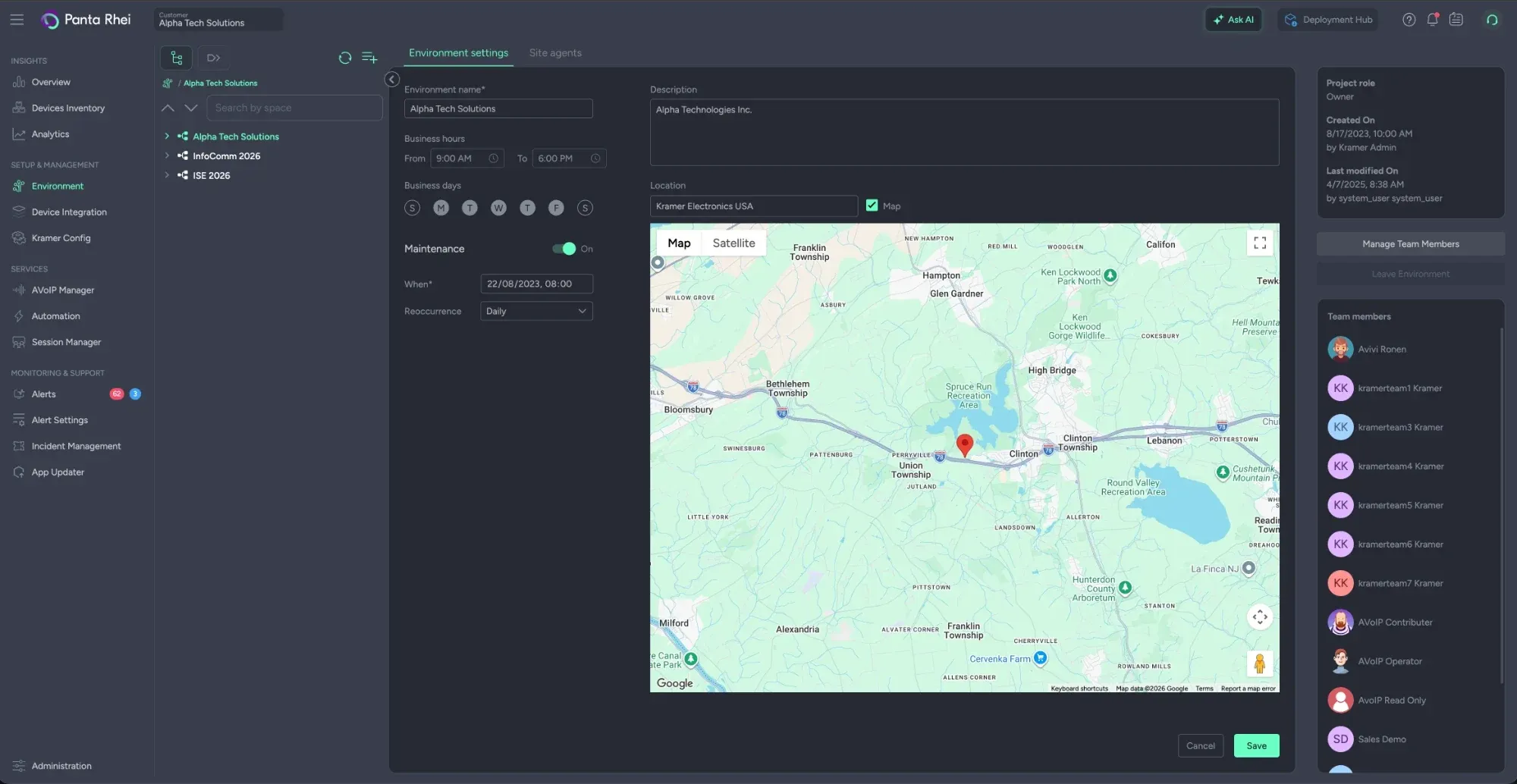
- 1One customer, several estates
Each environment is its own tree of sites, buildings, floors and rooms, with its own settings and team.
- 2Business hours and days
Set once here and inherited by every space. A single room can override them without a second environment.
- 3Maintenance window
A start, a time and a recurrence: the window scheduled firmware updates run inside, when the rooms are empty.
- 4Location
Pinned on a map rather than typed, so the estate can be looked at as places.
- 5Team and roles
Who works on this environment, as Owner, Contributor or Reader, invited and managed per environment.
What a device knows
about itself.
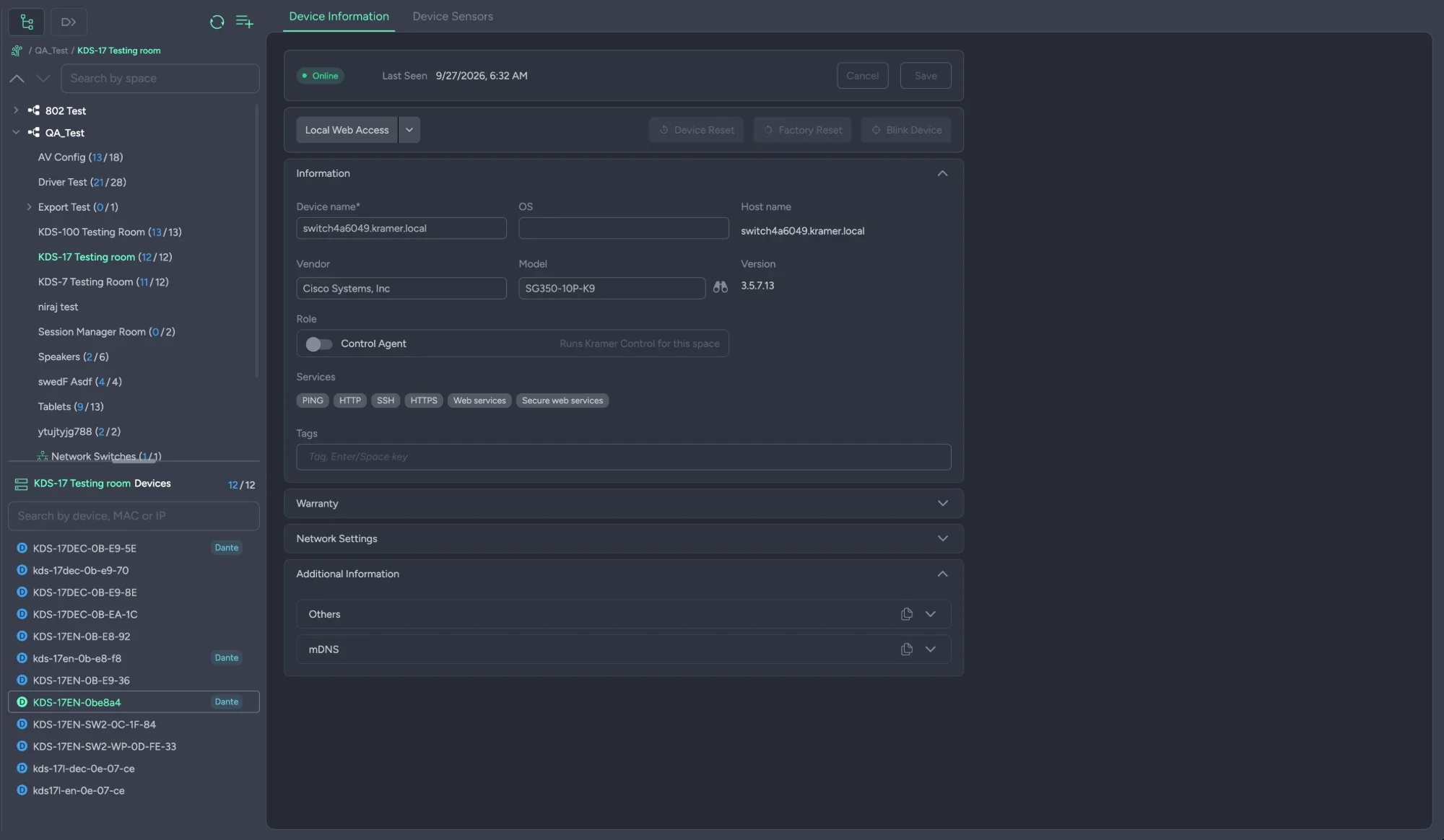
Everything Discovery brought back, everything you added, and the place it sits — on one screen, editable where it should be.
- ✦Identity. Name and host name, OS, vendor, model, version and serial, plus the services it answered on and your own tags.
- ✦Placement. Which space it is in, which network switch and port it hangs off, and every discovered address with its VLAN, CoS and DSCP.
- ✦Warranty. Serial, warranty end date and term, purchase and shipping dates, so the renewal question is a filter.
- ✦What it said about itself. The raw mDNS and UPnP metadata, kept with the record for the engineer who needs it.
Resources, per space
PDFs, as-built drawings, version notes and more, uploaded against the room they belong to and found from it.
Network Switches, as a space
Switches are discovered into their own space with a rich interface of their own, and can be operated on where write permission exists.
Reach it from here
Open the device's own web interface from its record. On Kramer hardware: reset, factory reset and blink.
Monitoring is a property
of the device.
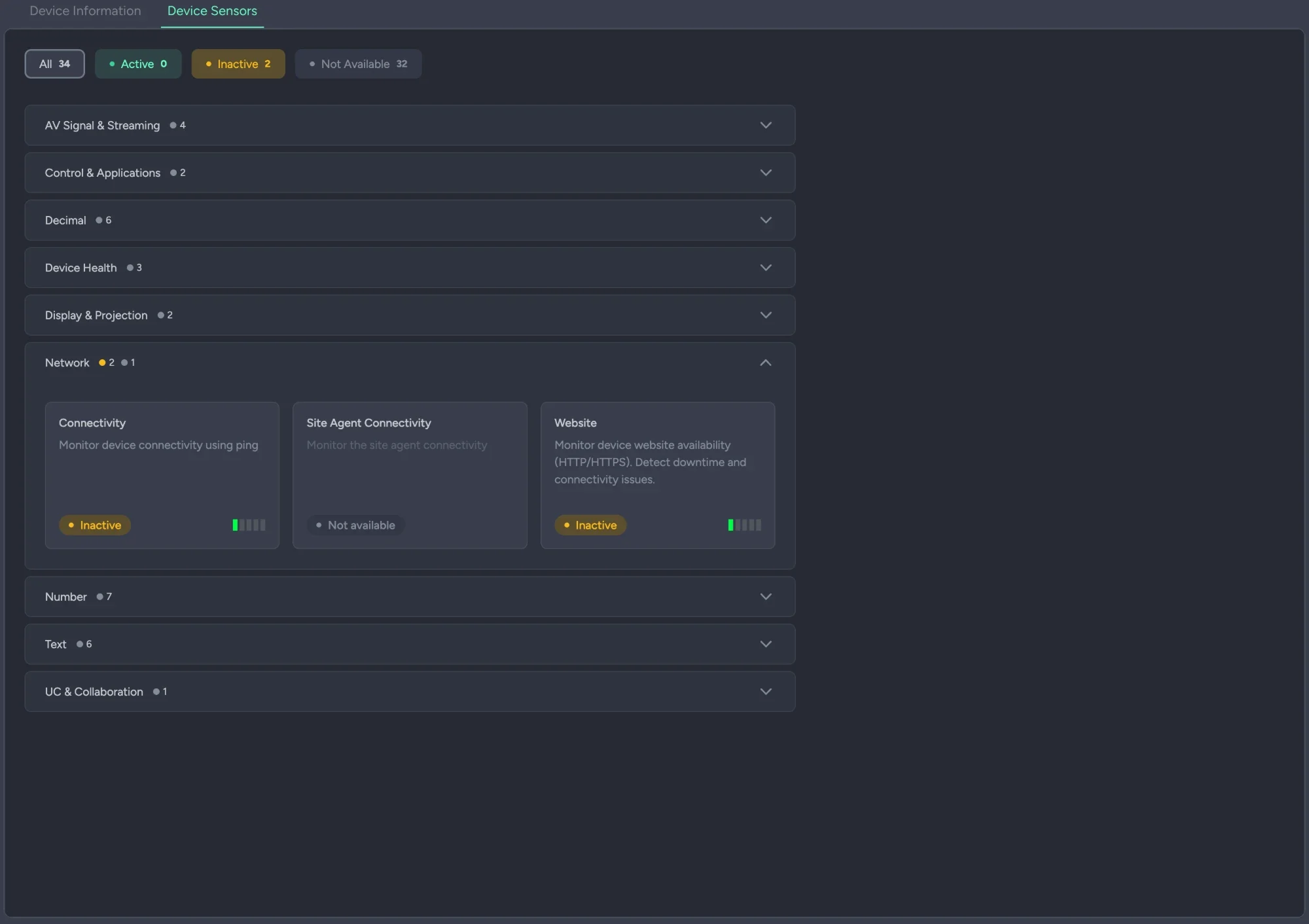
What is watched is decided on the record itself, by category, so monitoring inherits the structure instead of keeping its own.
- ✦On the device, by category. Network, device health, display and projection, AV signal, control, UC and collaboration, each switched on per device.
- ✦Read from the record, not beside it. A sensor is a property of the device in its space. When the room is renamed or the device moved, nothing has to be re-pointed.
- ✦Most come with the driver. Ping and web availability work for anything IP; the rest arrive with the driver a device is associated to.
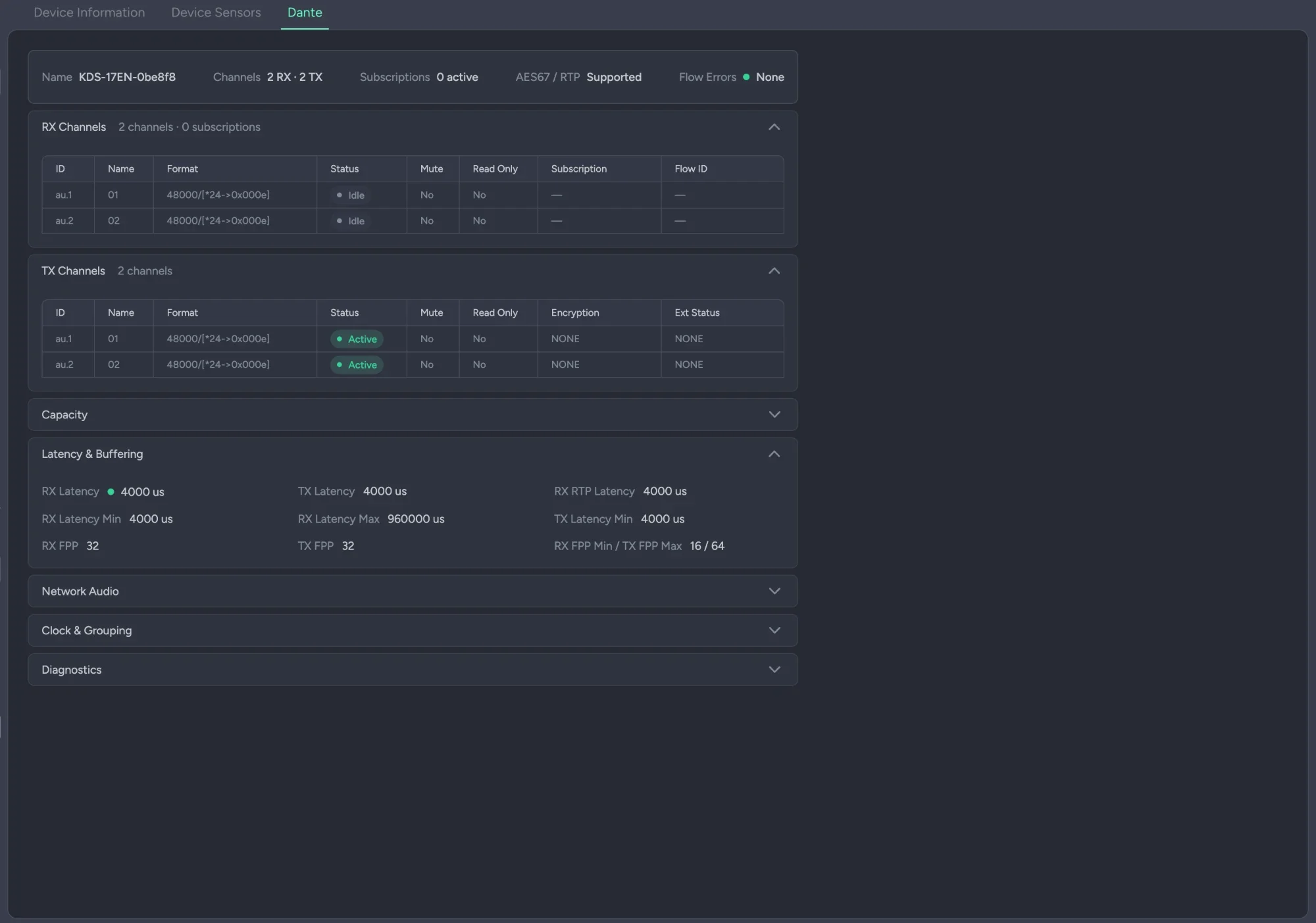
A Dante device,
opened up.
Dante hardware is discovered like everything else, and then shows a great deal more.
- ✦Discovered, then opened up. A Dante device is found like any other and carries a Dante tab of its own: channels, subscriptions, AES67 and RTP, flow errors.
- ✦Per channel. RX and TX channels with format, status, mute, read-only, subscription and flow ID, and encryption on the transmit side.
- ✦Down to the clock. Capacity, latency and buffering, network audio, clock and grouping, and diagnostics, each in its own panel.
Every device you own, in one list.
The same records read across the whole estate at once. This is the view procurement and audit questions are answered from.
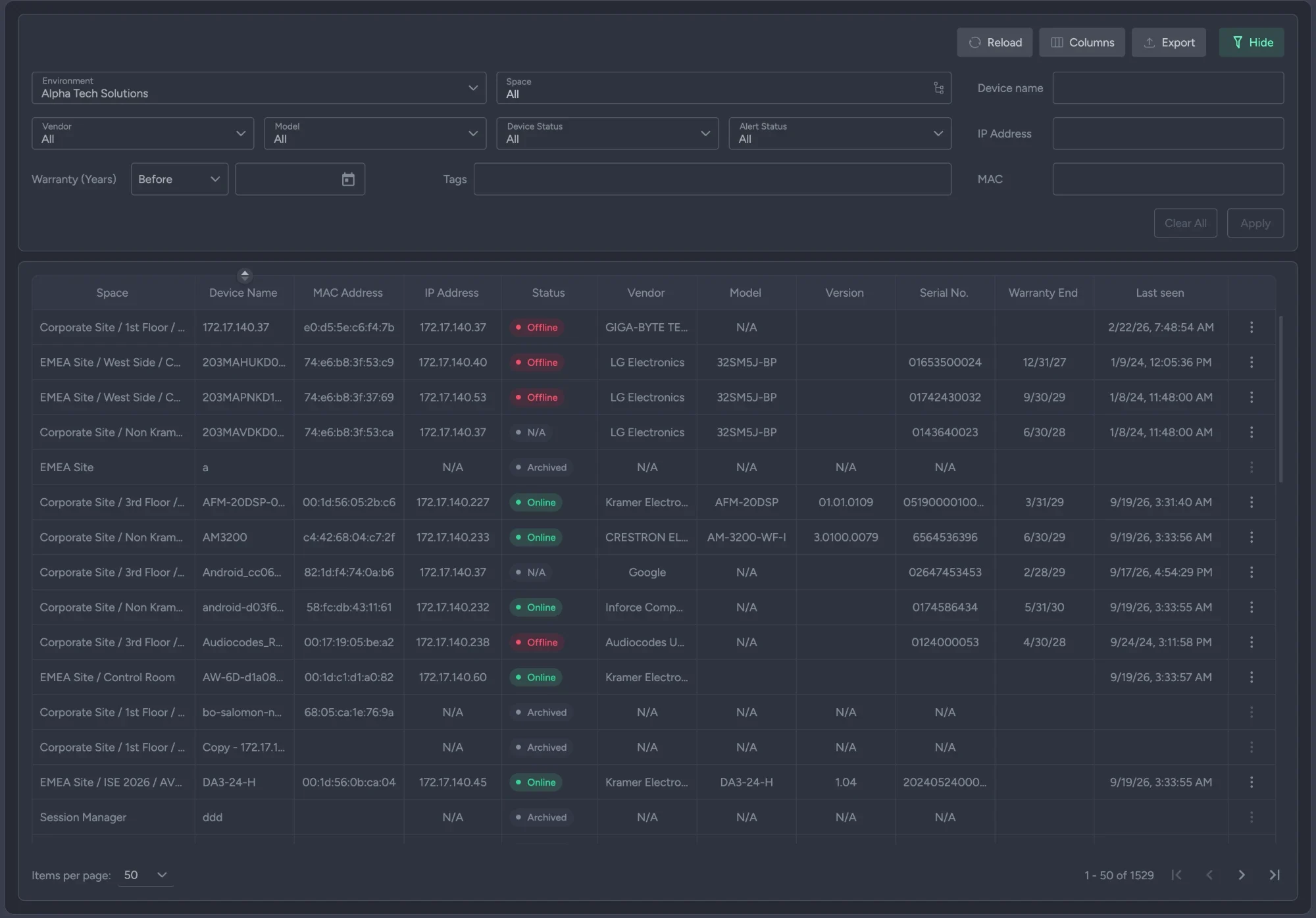
- ✦Filter to the question. Customer, environment and space; vendor and model; device and alert status; warranty expiry; name, IP, MAC and tags.
- ✦Pick the columns. Space, name, MAC, IP, status, vendor, model, version, serial, warranty end, OS and last seen, shown or hidden per view.
- ✦Export it. The current view, as a file. "What do we own, where is it, and what is out of warranty this quarter" is a click.
Warranty, before it lapses
Filter by warranty expiry and the renewal is a standing query rather than an annual scramble: the estate says what is about to fall out of cover while there is still time to do something about it.
The questions IT actually asks.
Can we set up the estate before any device is installed?
Yes. That is the intended order. Upload the structure and the planned devices from Excel, build it by hand, or scan devices in from the mobile app by serial or MAC. When Discovery later finds a device created with its MAC address, it is associated automatically.
What happens to a device the platform finds that we did not plan for?
It goes to Unassociated devices, visible in the tree with a count, and stays there until someone places it. Association is re-attempted at regular intervals, so a device you add later with its MAC is picked up without a rescan.
We have several sites and networks. Is that several environments?
Not necessarily. More than one Site Agent can connect to the same environment, and the Environment service consolidates what they all find into a single logical estate, even when the agents sit in different locations. An environment is drawn around the organization, not around the network.
How deep does the hierarchy go?
A customer holds environments; an environment holds spaces; and spaces nest as sites, buildings, floors and rooms. A space carries its own type, room type, capacity and room ID, so a lecture theater and a huddle room are different things, not just different names.
Do network switches and Dante devices get special treatment?
Both. Discovered switches are collected into a Network Switches space with an interface of their own, and can be operated on where write permission exists. Dante devices carry a Dante tab with channels, subscriptions, latency, clock and diagnostics.
Where do drawings, manuals and version notes live?
On the space. Resources such as PDFs, as-built drawings and version notes are uploaded against the room they describe, next to its devices, and found from there.
We are an integrator. What happens at handover?
An environment can be reassigned to a different customer, which is the documented path from a system integrator to the customer's own IT team. Structure, devices and history stay; ownership moves.
Does it work with equipment we did not buy from Kramer?
The tree, the inventory, the status and the monitoring are vendor-neutral: any IP-connected device from any vendor. Reset, factory reset and blink, and configuration and firmware updates, apply to Kramer hardware.
Bring your estate and we will structure it.
Most organizations already have a spreadsheet and a floor plan. A demo starts from those, and shows what the platform finds that the spreadsheet did not.
Wondering how the devices get there in the first place? Everything starts with Discovery.